Explains how TCP optimization reduces round-trip latency, improves throughput, and uses routers as TCP proxies.
TCP optimization is a feature that fine-tunes the processing of TCP data traffic to decrease round-trip latency and improve throughput.
How TCP optimization works
This article describes optimizing TCP traffic in service-side VPNs on Cisco IOS XE Catalyst SD-WAN devices.
Optimizing TCP traffic is especially useful for improving TCP traffic performance on long-latency links, such as transcontinental links and the high-latency transport links used by VSAT satellite communications systems. TCP optimization can also improve the performance of SaaS applications.
With TCP optimization, a router acts as a TCP proxy between a client that is initiating a TCP flow and a server that is listening for a TCP flow, as illustrated in the following figure:
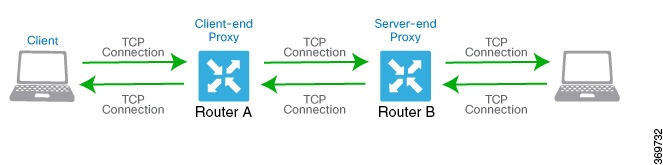
The figure shows two routers acting as proxies. Router A is the proxy for the client, and is called the client proxy. Router B is the proxy for the server, called the server proxy. Without TCP optimization, the client establishes a TCP connection directly to the server. When you enable TCP optimization on the two routers, Router A terminates the TCP connection from the client and establishes a TCP connection with Router B. Router B then establishes a TCP connection to the server. The two routers cache the TCP traffic in their buffers to ensure that the traffic from the client reaches the server without allowing the TCP connection to time out.
It is recommended that you configure TCP optimization on both the routers, the router closer to the client and the router closer to the server. This configuration is sometimes called a dual-ended proxy. It is possible to configure TCP optimization only on the router closer to the client, a scenario called single-ended proxy, but this configuration is not recommended because the TCP optimization process is compromised. TCP is a bidirectional protocol and operates only when connection-initiation messages (SYNs) are acknowledged by ACK messages in a timely fashion.
If both the client and the server are connected to the same router, no TCP optimization is performed.
To use TCP optimization, first enable the feature on the router. Then define which TCP traffic to optimize. Before you configure TCP optimization, to start with the configuration transaction, you can use the following command such as,
ntp server 198.51.241.229 source GigabitEthernet1 version 4The toptalker feature is supported exclusively on Cisco vEdge devices. For Cisco IOS XE Catalyst SD-WAN devices, use the AppQoE TCP optimization options.