Configure and Troubleshoot Downloadable ACLs on Catalyst 9800
Available Languages
Contents
Introduction
This document describes how to configure and troubleshoot downloadable ACLs (dACLs) on Catalyst 9800 Wireless LAN Controller (WLC).
Background Information
A dACL refers to the network device that dynamically downloads ACL entries from the RADIUS server when authentication occurs, rather than having a local copy of the ACL and being assigned the ACL name. A more complete Cisco ISE configuration example is available. This document focuses on the Cisco Catalyst 9800 which supports dACLs for central switching since the 17.10 release.
Prerequisites
This document aims to demonstrate dACLs usage on Catalyst 9800 through basic SSID configuration examples, showing how these can be fully customizable.
On the Catalyst 9800 Wireless Controller, downloadable ACLs are:
- Supported starting from the Cisco IOS XE Dublin 17.10.1 Release.
-
Supported for centralized controller with local mode Access Points only (or Flexconnect central switching).
-
FlexConnect Local Switching does not support dACL.
-
Requirements
Cisco recommends that you have knowledge of these topics:
- Catalyst Wireless 9800 Configuration Model.
- Cisco IP Access Control Lists (ACLs).
Components Used
The information in this document is based on these software and hardware versions:
- Catalyst 9800-CL (v. Dublin 17.12.03)
- ISE (v. 3.2)
The information in this document was created from the devices in a specific lab environment. All of the devices used in this document started with a cleared (default) configuration. If your network is live, ensure that you understand the potential impact of any command.
Configure
Throughout this configuration guide, even if methods are different (for example, WLAN authentication, policy configuration, and so on), the end result is the same. In the next scenario, two user identities are defined as USER1 and USER2. Both are granted access to the wireless network. Each is assigned ACL_USER1 and ACL_USER2 as dACLs downloaded by the Catalyst 9800 from ISE.
Using dACLs with 802.1x SSIDs
Network Diagram
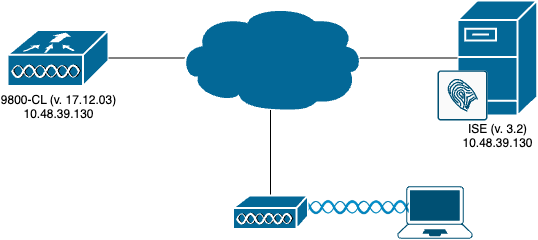
WLC Configuration
For details on 802.1x SSIDs configuration and troubleshooting on Catalyst 9800, refer to the Configure 802.1X Authentication on Catalyst 9800 Wireless Controller Series guide.
1. Configure the SSID. Configure a 802.1x authenticated SSID, using ISE as RADIUS server. In this document, the SSID has been named DACL_DOT1X_SSID.
From the GUI:
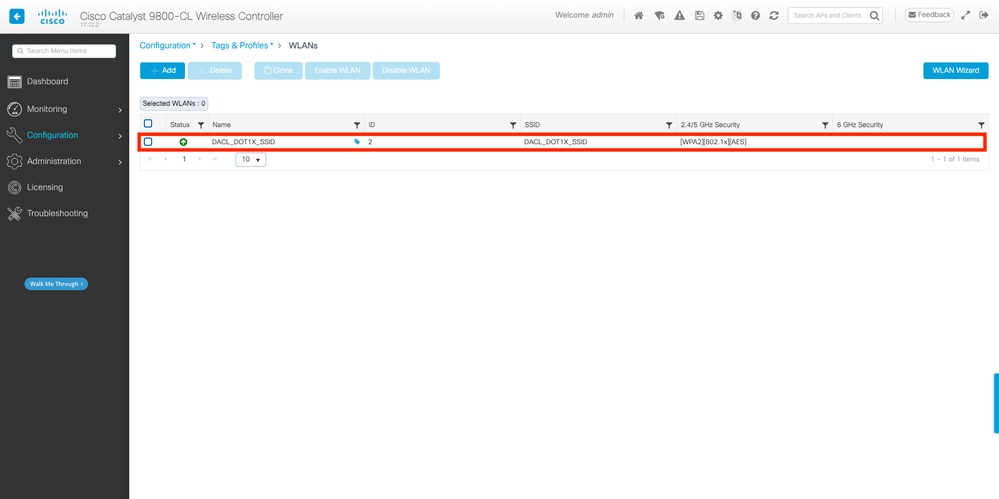
From the CLI:
WLC#configure terminal
WLC(config)#wlan DACL_DOT1X_SSID 2 DACL_DOT1X_SSID
WLC(config-wlan)#security dot1x authentication-list DOT1X
WLC(config-wlan)#no shutdownFrom the GUI:
1. Navigate to Configuration > Tags & Profiles > Policy, select the policy profile used and configure as showed in the next screenshot:
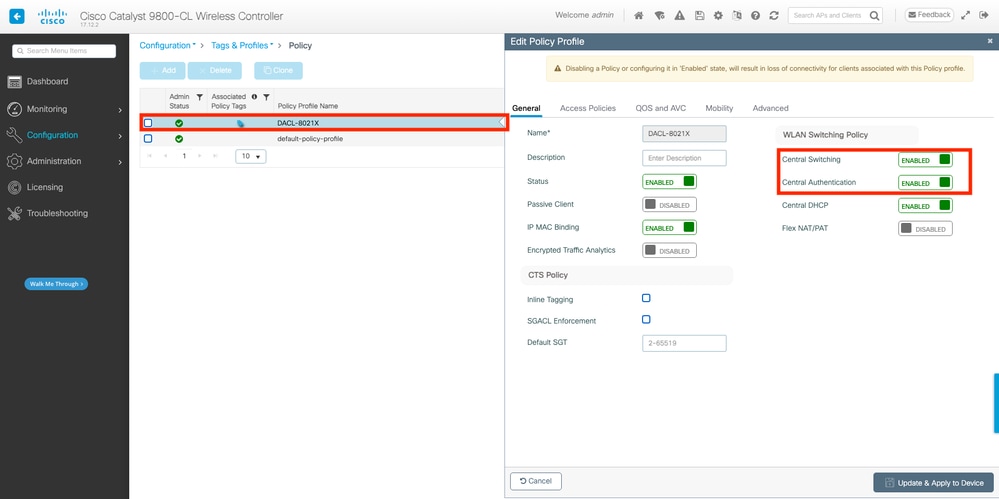
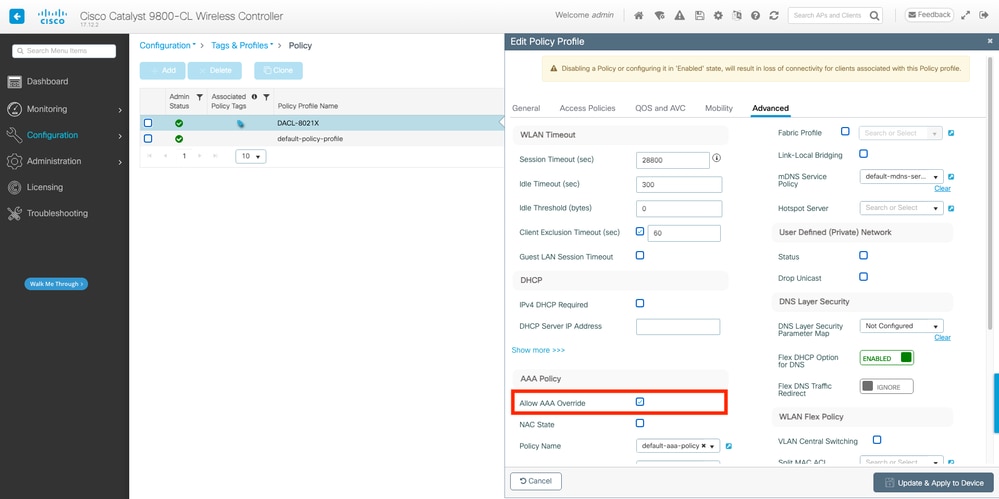
WLC#configure terminal
WLC(config)#wireless profile policy DACL-8021X
WLC(config-wireless-policy)#aaa-override
WLC(config-wireless-policy)#vlan VLAN_1413
WLC(config-wireless-policy)#no shutdown
2. Assign the policy profile and SSID to the policy tag used.
From the GUI:
3. Navigate to Configuration > Tags & Profiles > Tags. From the Policy tags tab, create (or select) the tag used and assign the WLAN and policy profile defined during Steps 1-2.
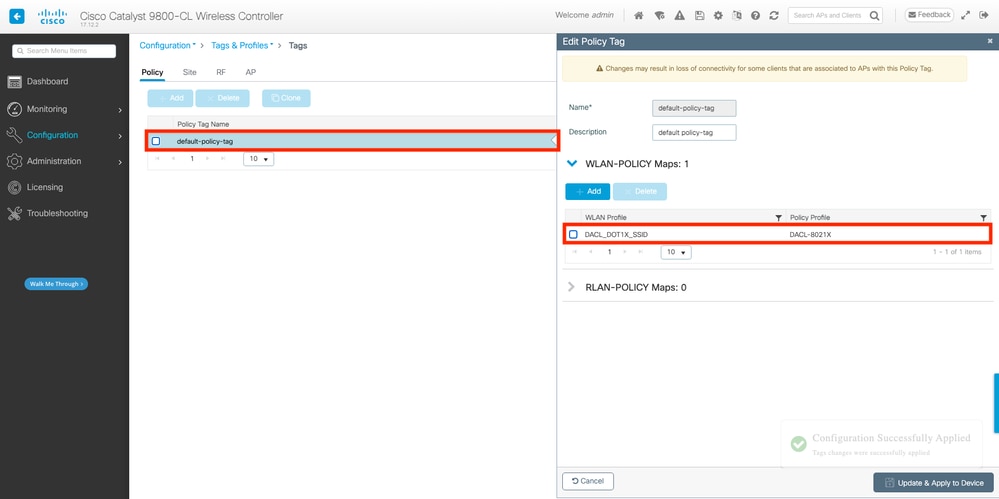
From the CLI:
WLC#configure terminal
WLC(config)#wireless tag policy default-policy-tag
WLC(config-policy-tag)#description "default policy-tag"
WLC(config-policy-tag)#wlan DACL_DOT1X_SSID policy DACL-8021X
4. Allow vendor-specific attributes. Downloadable ACLs are passed via vendor specific attributes (VSA) in the RADIUS exchange between ISE and the WLC. The support of these attributes can be enabled on the WLC by running these CLI commands.
From the CLI:
WLC#configure terminal
WLC(config)#radius-server vsa send authentication
5. Configure the default authorization list. When working with dACL, network authorization through RADIUS must be enforced for the WLC to authorize any user authenticating to the 802.1x SSID configured. The authorization phase is handled on the RADIUS server side. Therefore, the authorization list is required. dACLs require the usage of aaa authorization network method. You can use the default group radius with the command aaa authorization network default group radius:
From the GUI:
1. Navigate to Configuration > Security > AAA and from the AAA Method List > Authorization tab, create an authorization method similar to the next screenshot:
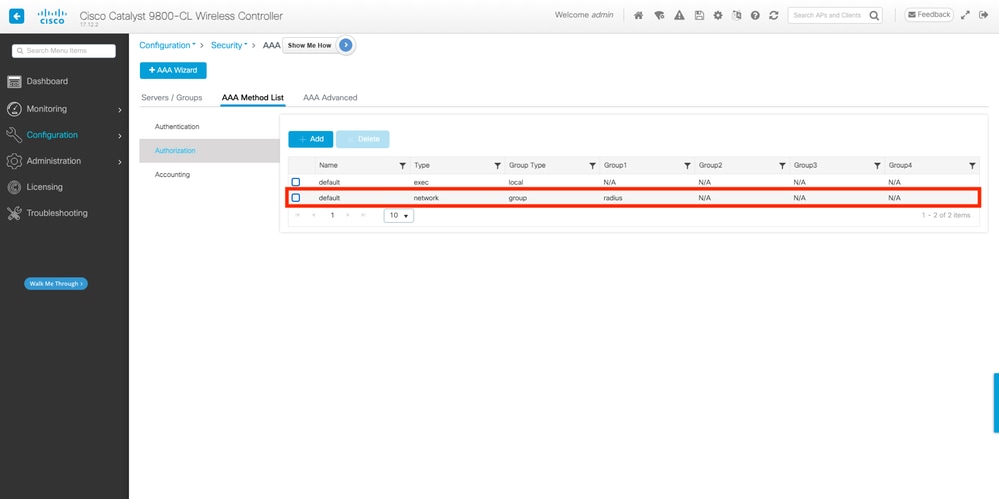
From the CLI:
WLC#configure terminal
WLC(config)#aaa authorization network default group radius
If you do not want to define a default method, you must define a named method. In this case, it is a mandatory step to call out the AAA Authorization Method List that ISE must use, otherwise the WLC cannot download the ACL:
On the WLC:
WLC(config)# aaa authorization network authZlist group authz-server-group
On the ISE, send this attribute along with the dACL: cisco-av-pair = Method-List=authZlist
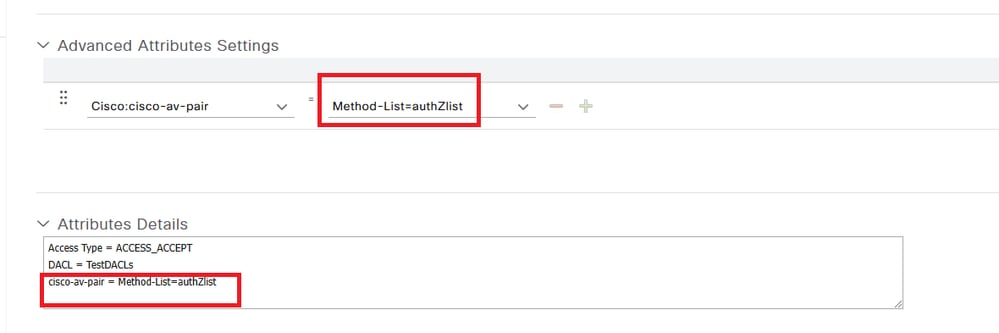
ISE Configuration
When implementing dACLs in a wireless environment with ISE, two common configurations are possible:
1. Per-user dACL Configuration: With this, each particular identity has a dACL assigned due to a custom identity field.
2. Per-result dACL Configuration: When opting for this method, a particular dACL is assigned to a user based on the authorization policy it matched on the policy set used.
Per-user dACLs
1. Define a dACL custom user attribute. To assign a dACL to a user identity, this field must be configurable on the identity created. By default, on ISE, the ACL field is not defined for any new identity created. To overcome this, you can use the Custom User Attribute and define a new configuration field.
2. Navigate to Administration > Identity Management > Settings > User Custom Attributes. Use the + button to add a new attribute, in this example, the name of the custom attribute is ACL:
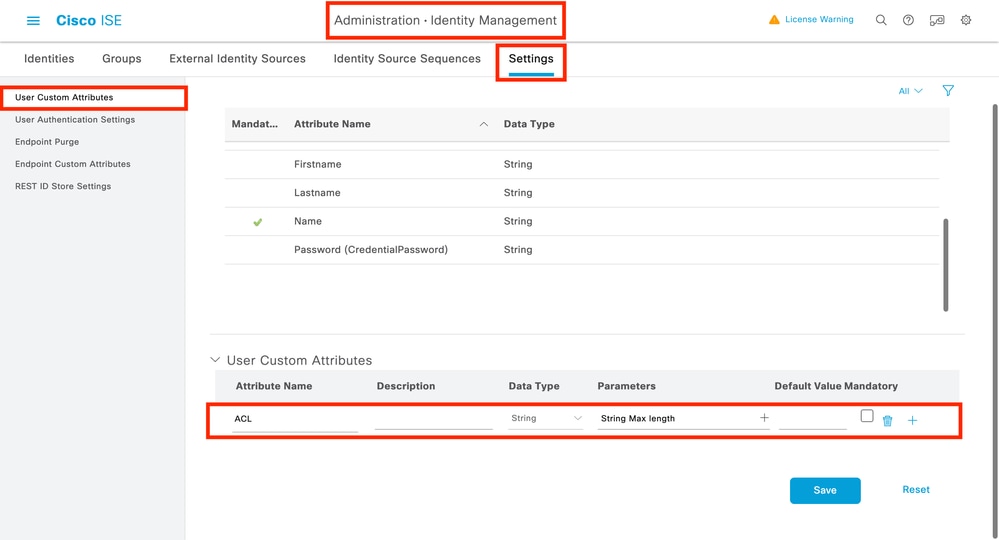
3. Once configured, click Save.
4. Configure the dACL. Navigate to Policy > Policy Elements > Results > Authorization > Downloadable ACLs to view and define dACL on ISE. Click Add button to create a new one.
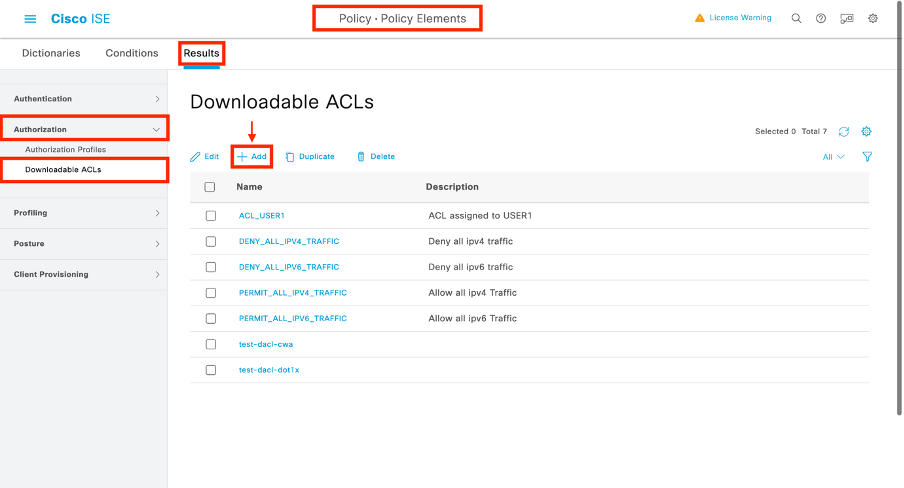
5. This opens a New Downloadable ACL configuration form. On this form, configure these fields:
- Name: The name of the dACL defined.
- Description (Optional): A brief description on the usage of the created dACL.
- IP Version: The IP protocol version used in the defined dACL (version 4, 6 or both).
- DACL Content: The content of the dACL, per Cisco IOS XE® ACL syntax.
In this document, the dACL used is ACL_USER1 and this dACL allows any traffic except the one destined to 10.48.39.186 and 10.48.39.13. Once the fields are configured, click Submit button to create the dACL.
Repeat the step to define the dACL for the second user, ACL_USER2.
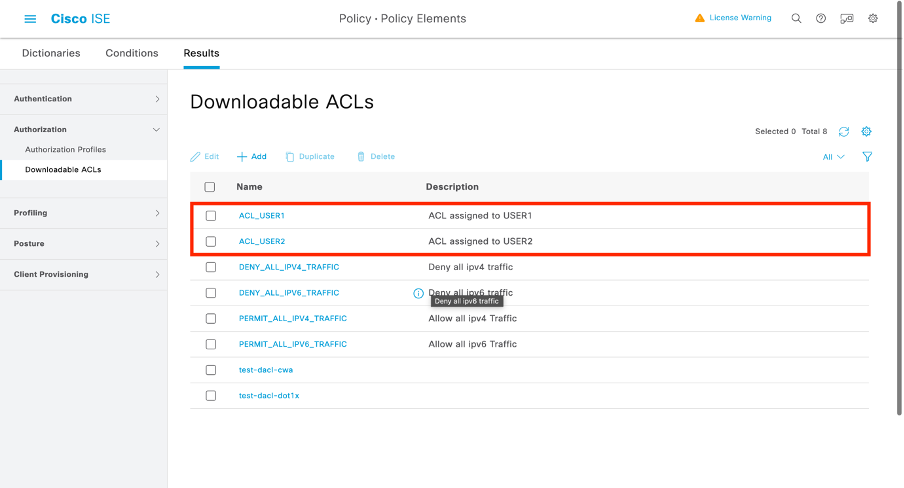
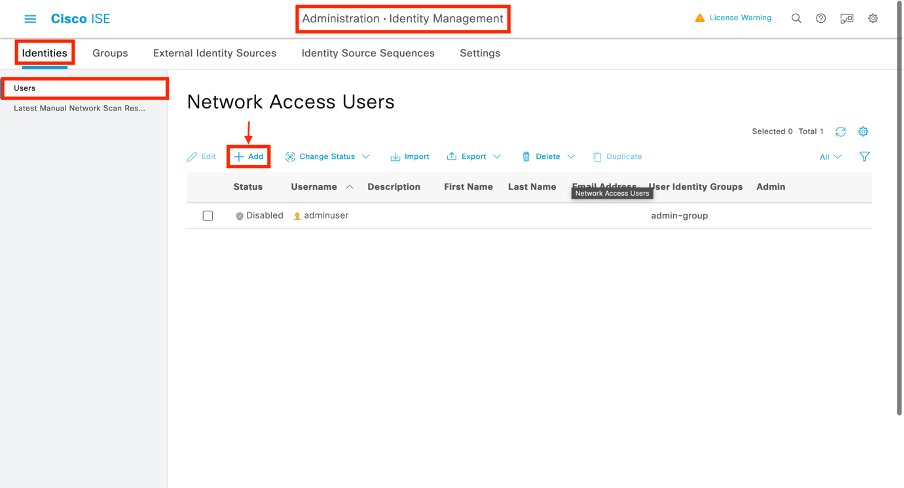
6. Assign the dACL to a created identity. Once the dACL is created, you can assign it to any ISE identity using the User Custom Attributes created in Step 1. TNavigate to Administration > Identity Management > Identities > Users. Click Add to create a user.
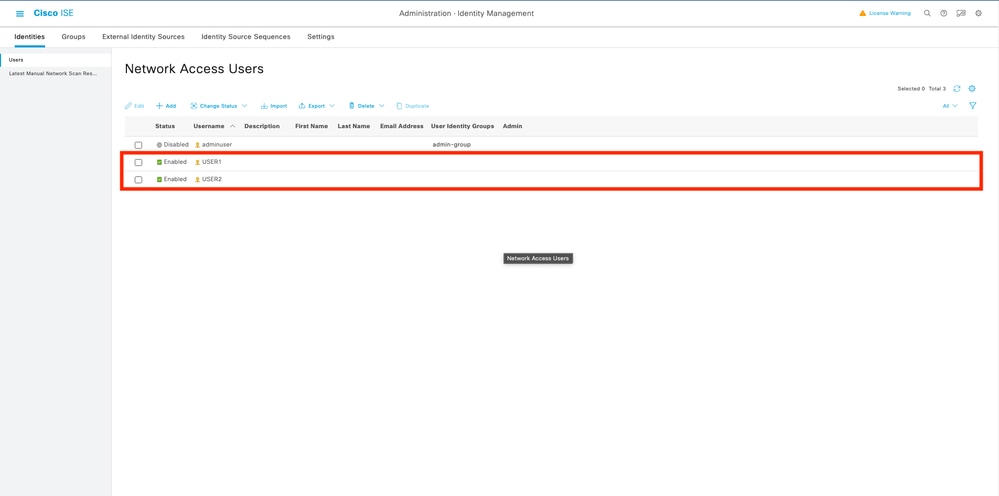
7. On the New Network Access User configuration form, define the username and password for the created user. Use the custom attribute ACL to assign the dACL created in Step 2 to the identity. In the example, the identity USER1 using ACL_USER1 is defined.
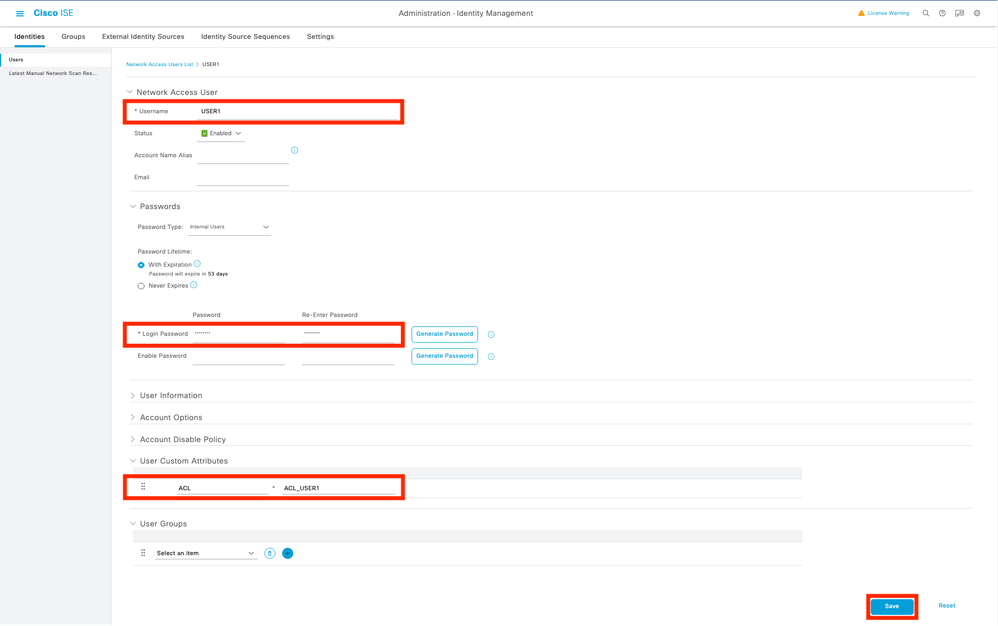
8. Once the fields are configured properly, click Submit button to create the identity. Repeat this step to create USER2 and assign ACL_USER2 to it.
9. Configure the authorization policy result. Once the identity is configured and the dACL is assigned, the authorization policy must still be configured to match the custom user attribute ACL defined to an existing authorization common task.
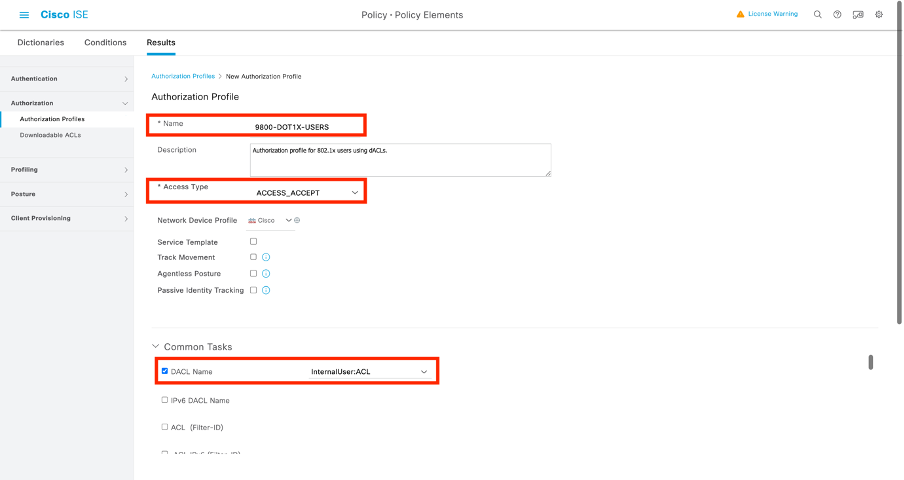
10. Navigate to Policy > Policy Elements > Results > Authorization > Authorization Profiles. Click Add to define a new authorization policy.
- Name: The name of the authorization policy, in this example, 9800-DOT1X-USERS is used.
- Access Type: The type of access used when this policy is matched, in this example ACCESS_ACCEPT is used.
- Common Task: Match DACL Name to InternalUser:<name of custom attribute created> for the internal user. According to the names used in this document, the profile 9800-DOT1X-USERS is configured with the dACL configured as InternalUser:ACL.
11. Use the authorization profile in policy set. Once the authorization profile result is correctly defined, it must be part of the policy set used to authenticate and authorize wireless users.
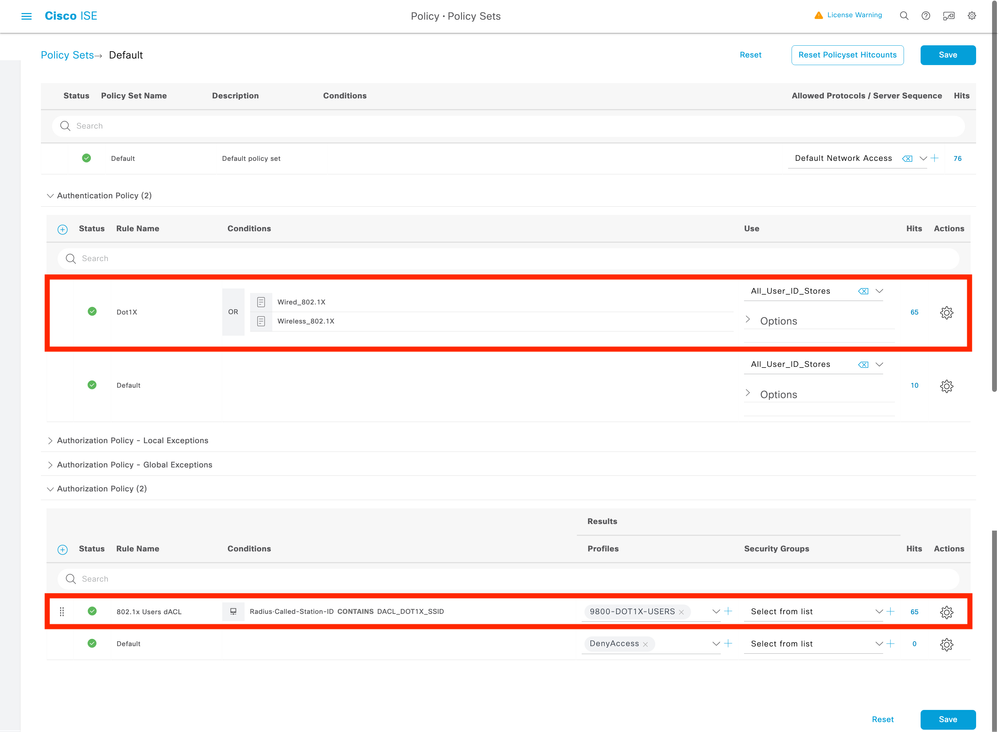
12. Navigate to Policy > Policy Sets and open the policy set used.
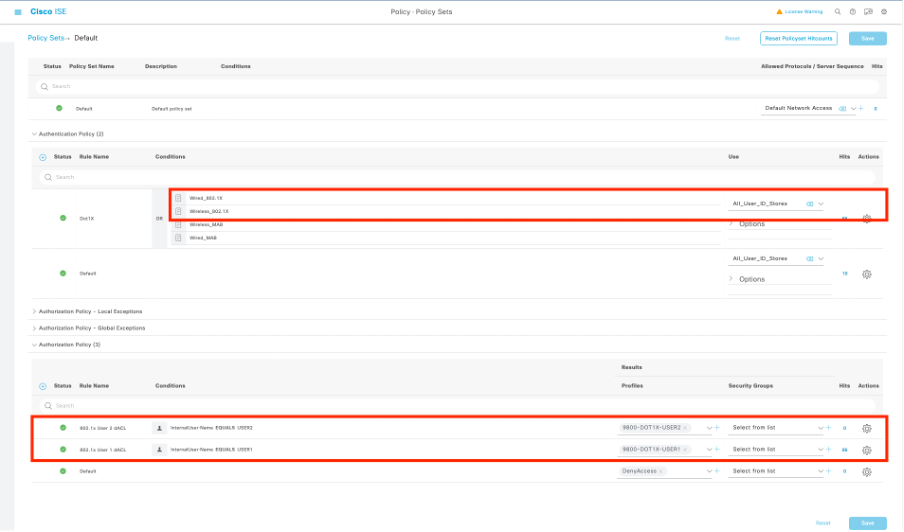
13. The authentication policy rule Dot1X matches any connection made via wired or wireless 802.1x. The authorization policy rule 802.1x Users dACL implements a condition on the SSID used (that is Radius-Called-Station-ID CONTAINS DACL_DOT1X_SSID). If an authorization is performed on the DACL_DOT1X_SSID WLAN, the profile 9800-DOT1X-USERS defined in Step 4 is used to authorize the user.
Per-Result dACLs
To avoid the task of assigning a particular dACL to each identity created on ISE, you can opt for applying the dACL to a specific policy result. This result is then applied based on any condition matched on the authorization rules from the policy set used.
1. Configure the dACL. Execute the same steps from Step 2 from the per-user dACLs section to define the dACLs required. These are ACL_USER1 and ACL_USER2.
2. Create identities. Navigate to Administration > Identity Management > Identities > Users and click the Add button to create a user.
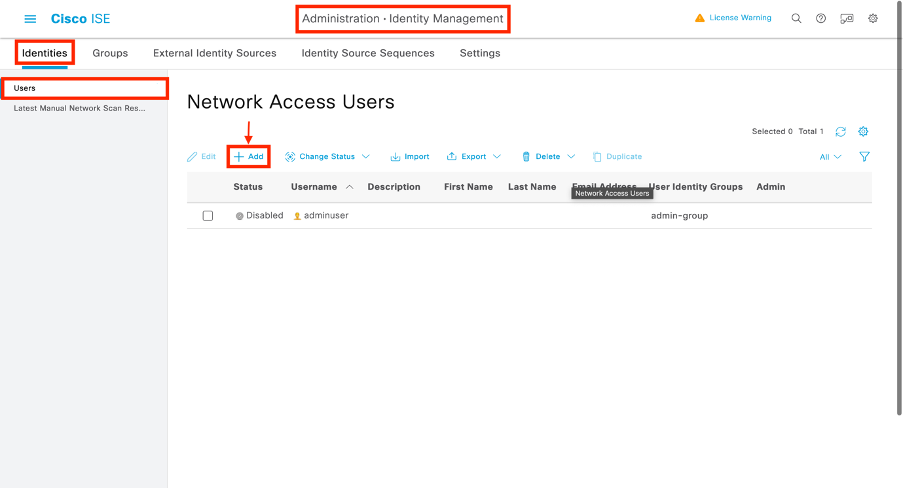
3. On the New Network Access User configuration form, define the username and password for the created user.
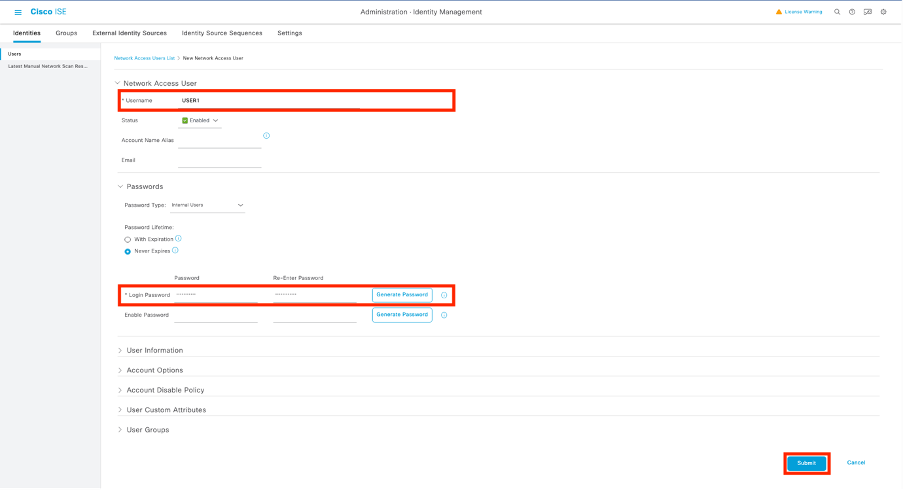
4. Repeat this step to create USER2.
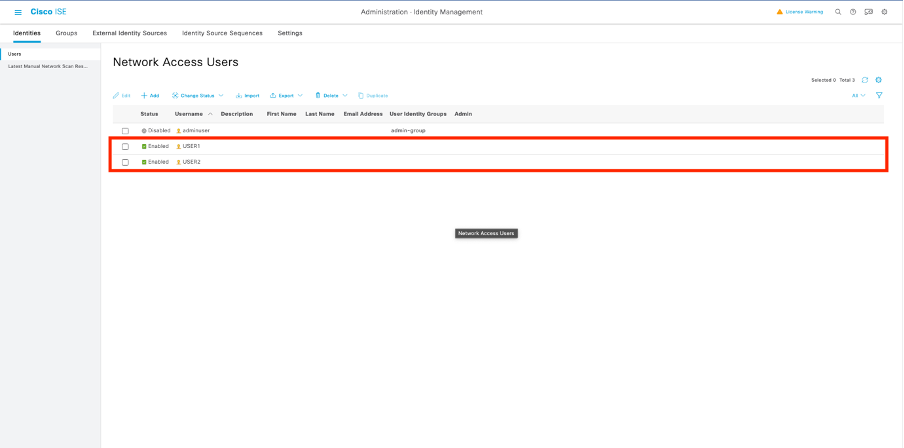
5. Configure the authorization policy result. Once the identity and the dACL is configured, the authorization policy must still be configured to assign a specific dACL to the user matching the condition to use this policy.
6. To do so, navigate to Policy > Policy Elements > Results > Authorization > Authorization Profiles. Click Add to define a new authorization policy and complete these fields:
- Name: The name of the authorization policy, in this example 9800-DOT1X-USER1 is used.
- Access Type: The type of access used when this policy is matched, in this example, ACCESS_ACCEPT is used.
- Common Task: Match the DACL Name to ACL_USER1 for an internal user. According to the names used in this document, the profile 9800-DOT1X-USER1 is configured with the dACL configured as ACL_USER1.
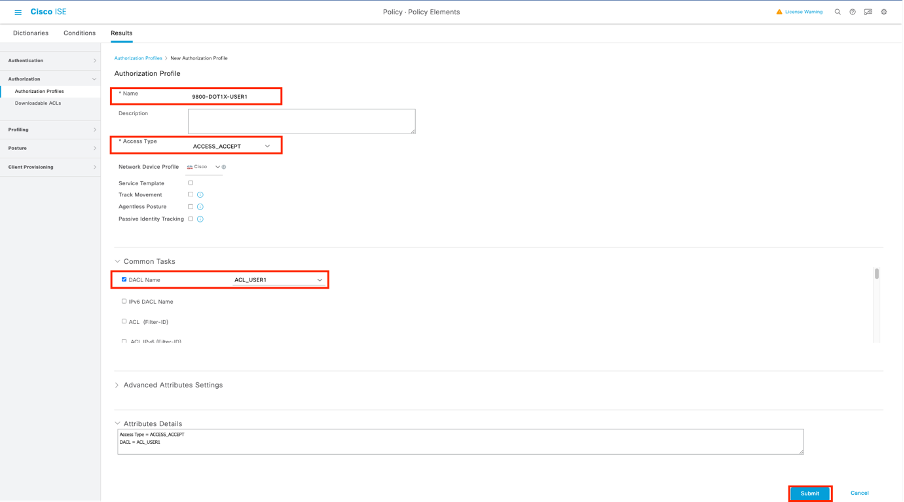
7. Repeat this step to create the policy result 9800-DOT1X-USER2 and assign ACL_USER2 as DACL to it.
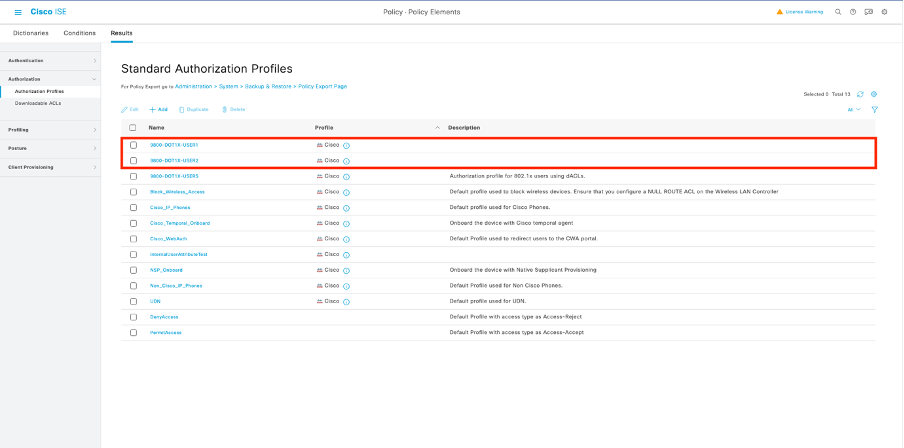
8. Use authorization profiles in a policy set. Once the authorization profile results are correctly defined, it still must part of the policy set used to authenticate and authorize wireless users.
9. Navigate to Policy > Policy Sets and open the policy set used.
10. The authentication policy rule Dot1X matches any connection made via wired or wireless 802.1X. The authorization policy rule 802.1X User 1 dACL implements a condition on the username used (that is InternalUser-Name CONTAINS USER1). If an authorization is performed using the username USER1, the profile 9800-DOT1X-USER1 defined in Step 4 is used to authorize the user and the dACL from this result (ACL_USER1) is applied to the user. The same is configure for username USER2 where 9800-DOT1X-USER1 is used.
Notes on Using dACLs with CWA SSIDs
As described in the Configure Central Web Authentication (CWA) on Catalyst 9800 WLC and ISE configuration guide, CWA relies on MAB and specific results to authenticate and authorize users. Downloadable ACLs can be added to the CWA configuration from the ISE side identically as what has been described previously.

Warning: Downloadable ACLs can only be used as network access list and are not supported as pre-authentication ACLs. Therefore, any pre-authentication ACLs used in a CWA workflow must be defined in the WLC configuration.
Verify
To verify the configuration, these commands can be used:
# show run wlan
# show run aaa
# show aaa servers
# show ap config general
# show ap name <ap-name> config general
# show ap tag summary
# show ap name <AP-name> tag detail
# show wlan { summary | id | nme | all }
# show wireless tag policy detailed <policy-tag-name>
# show wireless profile policy detailed <policy-profile-name>
# show access-lists { acl-name }
In this example, the referenced relevant part of the WLC configuration corresponding to this example is displayed:
aaa new-model
!
!
aaa group server radius authz-server-group
 server name DACL-RADIUS
!
aaa authentication login default local
aaa authentication dot1x default group radius
aaa authentication dot1x DOT1X group radius
aaa authorization exec default local
aaa authorization network default group radius
!
!
aaa server radius dynamic-author
 client <ISE IP>
!
aaa session-id common
!
[...]
vlan 1413
 name VLAN_1413
!
[...]
radius server DACL-RADIUS
 address ipv4 <ISE IP> auth-port 1812 acct-port 1813
 key 6 aHaOSX[QbbEHURGW`cXiG^UE]CR]^PVANfcbROb
!
!
[...]
wireless profile policy DACL-8021X
 aaa-override
 vlan VLAN_1413
 no shutdown
[...]
wireless tag policy default-policy-tag
 description "default policy-tag"
 wlan DACL_DOT1X_SSID policy DACL-8021X
[...]
wlan DACL_DOT1X_SSID 2 DACL_DOT1X_SSID
 security dot1x authentication-list DOT1X
 no shutdown
The RADIUS server configuration is presented, running the show running-config all command:
WLC#show running-config all | s radius-server
radius-server attribute 77 include-in-acct-req
radius-server attribute 77 include-in-access-req
radius-server attribute 11 default direction out
radius-server attribute nas-port format a
radius-server attribute wireless authentication call-station-id ap-macaddress-ssid
radius-server dead-criteria time 10 tries 10
radius-server cache expiry 24 enforce hours
radius-server transaction max-tries 8
radius-server retransmit 3
radius-server timeout 5
radius-server ipc-limit in 10
radius-server ipc-limit done 10
radius-server vsa send accounting
radius-server vsa send authentication
Troubleshoot
Checklist
- Ensure clients can connect properly to the 802.1X SSID configured.
- Ensure the RADIUS access-request/accept contain the proper attribute-value pairs (AVPs).
- Ensure clients use the proper WLAN/policy profile.
WLC One Stop-Shop Reflex
To check if the dACL is properly assigned to a particular wireless client, you can run the show wireless client mac-address <H.H.H> detail command. From there, some useful troubleshooting information can be found, namely: the client username, state, policy profile, WLAN and, most importantly here, the ACS-ACL.
WLC#show wireless client mac-address 08be.ac14.137d detail

Client MAC Address : 08be.ac14.137d
Client MAC Type : Universally Administered Address
Client DUID: NA
Client IPv4 Address : 10.14.13.240

Client Username : USER1 AP MAC Address : f4db.e65e.7bc0
AP Name: AP4800-E

Client State : Associated Policy Profile : DACL-8021X Wireless LAN Id: 2
WLAN Profile Name: DACL_DOT1X_SSID Wireless LAN Network Name (SSID): DACL_DOT1X_SSID BSSID : f4db.e65e.7bc0
Association Id : 1
Authentication Algorithm : Open System
Client Active State : In-Active
[...]
Client Join Time:
  Join Time Of Client : 03/28/2024 10:04:30 UTC
Client ACLs : None Policy Manager State: Run Last Policy Manager State : IP Learn Complete
Client Entry Create Time : 35 seconds
Policy Type : WPA2
Encryption Cipher : CCMP (AES)
Authentication Key Management : 802.1x
EAP Type : PEAP
VLAN Override after Webauth : No
VLAN : VLAN_1413 [...]
Session Manager:
  Point of Attachment : capwap_90000012
  IIF ID             : 0x90000012
  Authorized         : TRUE
  Session timeout    : 28800
  Common Session ID: 8227300A0000000C8484A22F
  Acct Session ID  : 0x00000000
  Last Tried Aaa Server Details:
  	Server IP : 10.48.39.134
  Auth Method Status List
  	Method : Dot1x
 SM State : AUTHENTICATED   		SM Bend State    : IDLE
  Local Policies:
 Service Template : wlan_svc_DACL-8021X_local (priority 254) VLAN : VLAN_1413 Absolute-Timer : 28800
  Server Policies:
 ACS ACL : xACSACLx-IP-ACL_USER1-65e89aab   Resultant Policies:
 ACS ACL : xACSACLx-IP-ACL_USER1-65e89aab VLAN Name : VLAN_1413 VLAN : 1413 Absolute-Timer : 28800
[...]
WLC Show Commands
To see all ACLs that are part of the Catalyst 9800 WLC configuration, you can run the show access-lists command. This command lists all ACLs defined locally or dACLs downloaded by the WLC. Any dACLs downloaded from ISE by the WLC have the xACSACLx-IP-<ACL_NAME>-<ACL_HASH> format.

Note: Downloadable ACLs remain in the configuration if a client is associated and uses it in the wireless infrastructure. Once the last client using the dACL leaves the infrastructure, the dACL is removed from the configuration.
WLC#show access-lists
Extended IP access list IP-Adm-V4-Int-ACL-global
[...]
Extended IP access list IP-Adm-V4-LOGOUT-ACL
[...]
Extended IP access list implicit_deny
[...]
Extended IP access list implicit_permit
[...]
Extended IP access list meraki-fqdn-dns
[...]
Extended IP access list preauth-ise
[...]
Extended IP access list preauth_v4
[...]
Extended IP access list xACSACLx-IP-ACL_USER1-65e89aab
    1 deny ip any host 10.48.39.13
    2 deny ip any host 10.48.39.15
    3 deny ip any host 10.48.39.186
    4 permit ip any any (56 matches)
IPv6 access list implicit_deny_v6
[...]
IPv6 access list implicit_permit_v6
[...]
IPv6 access list preauth_v6
[...]
Conditional Debugging and Radioactive Tracing
While troubleshooting the configuration, you can collect radioactive traces for a client assigned with the defined dACL. These are some highlighted logs displaying parts of the radioactive traces during an association process for client 08be.ac14.137d:
24/03/28 10:43:04.321315612 {wncd_x_R0-0}{1}: [client-orch-sm] [19620]: (note): MAC: 08be.ac14.137d Association received. BSSID f4db.e65e.7bc0, WLAN DACL_DOT1X_SSID, Slot 0 AP f4db.e65e.7bc0, AP4800-E, Site tag default-site-tag, Policy tag default-policy-tag, Policy profile DACL-8021X, Switching Central, old BSSID 80e8.6fd5.73a0, Socket delay 0ms
2024/03/28 10:43:04.321414308 {wncd_x_R0-0}{1}: [client-orch-sm] [19620]: (debug): MAC: 08be.ac14.137d Received Dot11 association request. Processing started,SSID: DACL_DOT1X_SSID, Policy profile: DACL-8021X, AP Name: AP4800-E, Ap Mac Address: f4db.e65e.7bc0BSSID MAC80e8.6fd5.73a0wlan ID: 2RSSI: -58, SNR: 36
2024/03/28 10:43:04.321464486 {wncd_x_R0-0}{1}: [client-orch-state] [19620]: (note): MAC: 08be.ac14.137d Client state transition: S_CO_L2_AUTH_IN_PROGRESS -> S_CO_L2_AUTH_IN_PROGRESS
[...]
2024/03/28 10:43:04.322185953 {wncd_x_R0-0}{1}: [dot11] [19620]: (note): MAC: 08be.ac14.137d Association success. AID 2, Roaming = True, WGB = False, 11r = False, 11w = False Fast roam = False
2024/03/28 10:43:04.322199665 {wncd_x_R0-0}{1}: [dot11] [19620]: (info): MAC: 08be.ac14.137d DOT11 state transition: S_DOT11_ASSOCIATED -> S_DOT11_ASSOCIATED
[...]
2024/03/28 10:43:04.322860054 {wncd_x_R0-0}{1}: [client-orch-sm] [19620]: (debug): MAC: 08be.ac14.137d Starting L2 authentication. Bssid in state machine:f4db.e65e.7bc0 Bssid in request is:f4db.e65e.7bc0
2024/03/28 10:43:04.322881795 {wncd_x_R0-0}{1}: [client-orch-state] [19620]: (note): MAC: 08be.ac14.137d Client state transition: S_CO_L2_AUTH_IN_PROGRESS -> S_CO_L2_AUTH_IN_PROGRESS
[...]
2024/03/28 10:43:04.323379781 {wncd_x_R0-0}{1}: [client-auth] [19620]: (info): MAC: 08be.ac14.137d Client auth-interface state transition: S_AUTHIF_DOT1XAUTH_PENDING -> S_AUTHIF_DOT1XAUTH_PENDING
[...]
2024/03/28 10:43:04.330181613 {wncd_x_R0-0}{1}: [client-auth] [19620]: (info): MAC: 08be.ac14.137d Client auth-interface state transition: S_AUTHIF_DOT1XAUTH_PENDING -> S_AUTHIF_ADD_MOBILE_ACK_WAIT_DOT1X
2024/03/28 10:43:04.353413199 {wncd_x_R0-0}{1}: [auth-mgr-feat_wireless] [19620]: (info): [08be.ac14.137d:capwap_90000012] - authc_list: DOT1X
2024/03/28 10:43:04.353414496 {wncd_x_R0-0}{1}: [auth-mgr-feat_wireless] [19620]: (info): [08be.ac14.137d:capwap_90000012] - authz_list: Not present under wlan configuration
2024/03/28 10:43:04.353438621 {wncd_x_R0-0}{1}: [client-auth] [19620]: (note): MAC: 08be.ac14.137d L2 Authentication initiated. method DOT1X, Policy VLAN 0, AAA override = 1 , NAC = 0
2024/03/28 10:43:04.353443674 {wncd_x_R0-0}{1}: [client-auth] [19620]: (info): MAC: 08be.ac14.137d Client auth-interface state transition: S_AUTHIF_ADD_MOBILE_ACK_WAIT_DOT1X -> S_AUTHIF_DOT1XAUTH_PENDING
[...]
2024/03/28 10:43:04.381397739 {wncd_x_R0-0}{1}: [radius] [19620]: (info): RADIUS: Send Access-Request to 10.48.39.134:1812 id 0/96, len 418
2024/03/28 10:43:04.381411901 {wncd_x_R0-0}{1}: [radius] [19620]: (info): RADIUS: authenticator e9 8b e2 87 a5 42 1e b7 - 96 d0 3a 32 3c d1 dc 71
2024/03/28 10:43:04.381425481 {wncd_x_R0-0}{1}: [radius] [19620]: (info): RADIUS: User-Name [1] 7 "USER1"
2024/03/28 10:43:04.381430559 {wncd_x_R0-0}{1}: [radius] [19620]: (info): RADIUS: Service-Type [6] 6 Framed [2]
2024/03/28 10:43:04.381433583 {wncd_x_R0-0}{1}: [radius] [19620]: (info): RADIUS: Vendor, Cisco [26] 27
2024/03/28 10:43:04.381437476 {wncd_x_R0-0}{1}: [radius] [19620]: (info): RADIUS: Cisco AVpair [1] 21 "service-type=Framed"
2024/03/28 10:43:04.381440925 {wncd_x_R0-0}{1}: [radius] [19620]: (info): RADIUS: Framed-MTU [12] 6 1485
2024/03/28 10:43:04.381452676 {wncd_x_R0-0}{1}: [radius] [19620]: (info): RADIUS: EAP-Message [79] 12 ...
2024/03/28 10:43:04.381466839 {wncd_x_R0-0}{1}: [radius] [19620]: (info): RADIUS: Message-Authenticator[80] 18 ...
2024/03/28 10:43:04.381482891 {wncd_x_R0-0}{1}: [radius] [19620]: (info): RADIUS: EAP-Key-Name [102] 2 *
2024/03/28 10:43:04.381486879 {wncd_x_R0-0}{1}: [radius] [19620]: (info): RADIUS: Vendor, Cisco [26] 49
2024/03/28 10:43:04.381489488 {wncd_x_R0-0}{1}: [radius] [19620]: (info): RADIUS: Cisco AVpair [1] 43 "audit-session-id=8227300A000000A284A7BB88"
2024/03/28 10:43:04.381491463 {wncd_x_R0-0}{1}: [radius] [19620]: (info): RADIUS: Vendor, Cisco [26] 20
2024/03/28 10:43:04.381494016 {wncd_x_R0-0}{1}: [radius] [19620]: (info): RADIUS: Cisco AVpair [1] 14 "method=dot1x"
2024/03/28 10:43:04.381495896 {wncd_x_R0-0}{1}: [radius] [19620]: (info): RADIUS: Vendor, Cisco [26] 32
2024/03/28 10:43:04.381498320 {wncd_x_R0-0}{1}: [radius] [19620]: (info): RADIUS: Cisco AVpair [1] 26 "client-iif-id=2734691488"
2024/03/28 10:43:04.381500186 {wncd_x_R0-0}{1}: [radius] [19620]: (info): RADIUS: Vendor, Cisco [26] 20
2024/03/28 10:43:04.381502409 {wncd_x_R0-0}{1}: [radius] [19620]: (info): RADIUS: Cisco AVpair [1] 14 "vlan-id=1413"
2024/03/28 10:43:04.381506029 {wncd_x_R0-0}{1}: [radius] [19620]: (info): RADIUS: NAS-IP-Address [4] 6 10.48.39.130
2024/03/28 10:43:04.381509052 {wncd_x_R0-0}{1}: [radius] [19620]: (info): RADIUS: NAS-Port-Type [61] 6 802.11 wireless [19]
2024/03/28 10:43:04.381511493 {wncd_x_R0-0}{1}: [radius] [19620]: (info): RADIUS: NAS-Port [5] 6 3913
2024/03/28 10:43:04.381513163 {wncd_x_R0-0}{1}: [radius] [19620]: (info): RADIUS: Vendor, Cisco [26] 39
2024/03/28 10:43:04.381515481 {wncd_x_R0-0}{1}: [radius] [19620]: (info): RADIUS: Cisco AVpair [1] 33 "cisco-wlan-ssid=DACL_DOT1X_SSID"
2024/03/28 10:43:04.381517373 {wncd_x_R0-0}{1}: [radius] [19620]: (info): RADIUS: Vendor, Cisco [26] 41
2024/03/28 10:43:04.381519675 {wncd_x_R0-0}{1}: [radius] [19620]: (info): RADIUS: Cisco AVpair [1] 35 "wlan-profile-name=DACL_DOT1X_SSID"
2024/03/28 10:43:04.381522158 {wncd_x_R0-0}{1}: [radius] [19620]: (info): RADIUS: Called-Station-Id [30] 35 "f4-db-e6-5e-7b-c0:DACL_DOT1X_SSID"
2024/03/28 10:43:04.381524583 {wncd_x_R0-0}{1}: [radius] [19620]: (info): RADIUS: Calling-Station-Id [31] 19 "08-be-ac-14-13-7d"
2024/03/28 10:43:04.381532045 {wncd_x_R0-0}{1}: [radius] [19620]: (info): RADIUS: Vendor, Airespace [26] 12
2024/03/28 10:43:04.381534716 {wncd_x_R0-0}{1}: [radius] [19620]: (info): RADIUS: Airespace-WLAN-ID [1] 6 2
2024/03/28 10:43:04.381537215 {wncd_x_R0-0}{1}: [radius] [19620]: (info): RADIUS: Nas-Identifier [32] 17 "DACL_DOT1X_SSID"
2024/03/28 10:43:04.381539951 {wncd_x_R0-0}{1}: [radius] [19620]: (info): RADIUS: wlan-group-cipher [187] 6 " "
2024/03/28 10:43:04.381542233 {wncd_x_R0-0}{1}: [radius] [19620]: (info): RADIUS: wlan-pairwise-cipher[186] 6 " "
2024/03/28 10:43:04.381544465 {wncd_x_R0-0}{1}: [radius] [19620]: (info): RADIUS: wlan-akm-suite [188] 6 " "
2024/03/28 10:43:04.381619890 {wncd_x_R0-0}{1}: [radius] [19620]: (info): RADIUS: Started 5 sec timeout
[...]
2024/03/28 10:43:04.392544173 {wncd_x_R0-0}{1}: [radius] [19620]: (info): RADIUS: Received from id 1812/96 10.48.39.134:0, Access-Challenge, len 117
2024/03/28 10:43:04.392557998 {wncd_x_R0-0}{1}: [radius] [19620]: (info): RADIUS: authenticator 08 6d fa 56 48 1c 43 f3 - 84 d6 20 24 7a 90 7d e5
2024/03/28 10:43:04.392564273 {wncd_x_R0-0}{1}: [radius] [19620]: (info): RADIUS: State [24] 71 ...
2024/03/28 10:43:04.392615218 {wncd_x_R0-0}{1}: [radius] [19620]: (info): RADIUS: EAP-Message [79] 8 ...
2024/03/28 10:43:04.392628179 {wncd_x_R0-0}{1}: [radius] [19620]: (info): RADIUS: Message-Authenticator[80] 18 ...
2024/03/28 10:43:04.392738554 {wncd_x_R0-0}{1}: [radius] [19620]: (info): Valid Response Packet, Free the identifier
2024/03/28 10:43:04.726798622 {wncd_x_R0-0}{1}: [dot1x] [19620]: (info): [08be.ac14.137d:capwap_90000012] Raised identity update event for eap method PEAP
2024/03/28 10:43:04.726801212 {wncd_x_R0-0}{1}: [dot1x] [19620]: (info): [08be.ac14.137d:capwap_90000012] Received an EAP Success
2024/03/28 10:43:04.726896276 {wncd_x_R0-0}{1}: [dot1x] [19620]: (info): [08be.ac14.137d:capwap_90000012] Entering idle state
2024/03/28 10:43:04.726905248 {wncd_x_R0-0}{1}: [dot1x] [19620]: (info): [08be.ac14.137d:capwap_90000012] Posting AUTH_SUCCESS on Client
[...]
2024/03/28 10:43:04.727138915 {wncd_x_R0-0}{1}: [dot1x] [19620]: (info): [08be.ac14.137d:capwap_90000012] EAPOL packet sent to client
2024/03/28 10:43:04.727148212 {wncd_x_R0-0}{1}: [auth-mgr] [19620]: (info): [08be.ac14.137d:capwap_90000012] Authc success from Dot1X, Auth event success
2024/03/28 10:43:04.727164223 {wncd_x_R0-0}{1}: [auth-mgr] [19620]: (info): [08be.ac14.137d:capwap_90000012] Raised event APPLY_USER_PROFILE (14)
2024/03/28 10:43:04.727169069 {wncd_x_R0-0}{1}: [auth-mgr] [19620]: (info): [08be.ac14.137d:capwap_90000012] Raised event RX_METHOD_AUTHC_SUCCESS (3)
2024/03/28 10:43:04.727223736 {wncd_x_R0-0}{1}: [aaa-attr-inf] [19620]: (info): Applying Attribute : username 0 "USER1"
2024/03/28 10:43:04.727233018 {wncd_x_R0-0}{1}: [aaa-attr-inf] [19620]: (info): Applying Attribute : class 0 43 41 43 53 3a 38 32 32 37 33 30 30 41 30 30 30 30 30 30 41 32 38 34 41 37 42 42 38 38 3a 69 73 65 2f 34 39 39 36 31 30 38 38 35 2f 34 37
2024/03/28 10:43:04.727234046 {wncd_x_R0-0}{1}: [aaa-attr-inf] [19620]: (info): Applying Attribute : EAP-Message 0 <hidden>
2024/03/28 10:43:04.727234996 {wncd_x_R0-0}{1}: [aaa-attr-inf] [19620]: (info): Applying Attribute : Message-Authenticator 0 <hidden>
2024/03/28 10:43:04.727236141 {wncd_x_R0-0}{1}: [aaa-attr-inf] [19620]: (info): Applying Attribute : EAP-session-id 0 "fGøflS‹‰PÁ3+%:2
M$®vf9∫Ø◊« %ÿ0ã@≤™ÇÑbWï6\Ë&\q·lU+QB–º®”≠∫JÑv"
2024/03/28 10:43:04.727246409 {wncd_x_R0-0}{1}: [aaa-attr-inf] [19620]: (info): Applying Attribute : CiscoSecure-Defined-ACL 0 "#ACSACL#-IP-ACL_USER1-65e89aab"
[...]
2024/03/28 10:43:04.727509267 {wncd_x_R0-0}{1}: [auth-mgr] [19620]: (info): [08be.ac14.137d:capwap_90000012] Method dot1x changing state from 'Running' to 'Authc Success'
2024/03/28 10:43:04.727513133 {wncd_x_R0-0}{1}: [auth-mgr] [19620]: (info): [08be.ac14.137d:capwap_90000012] Context changing state from 'Running' to 'Authc Success'
2024/03/28 10:43:04.727607738 {wncd_x_R0-0}{1}: [svm] [19620]: (info): SVM_INFO: SVM Apply user profile
2024/03/28 10:43:04.728003638 {wncd_x_R0-0}{1}: [svm] [19620]: (info): SVM_INFO: Activating EPM features with UP
2024/03/28 10:43:04.728144450 {wncd_x_R0-0}{1}: [epm-misc] [19620]: (info): [08be.ac14.137d:capwap_90000012] Username USER1 received
2024/03/28 10:43:04.728161361 {wncd_x_R0-0}{1}: [epm] [19620]: (info): [08be.ac14.137d:capwap_90000012] Feature (EPM MISC PLUG-IN) has been started (status Success)
2024/03/28 10:43:04.728177773 {wncd_x_R0-0}{1}: [epm] [19620]: (info): [08be.ac14.137d:capwap_90000012] Feature (SM ACCOUNTING PLUG-IN) has been started (status Success)
2024/03/28 10:43:04.728184975 {wncd_x_R0-0}{1}: [epm] [19620]: (info): [08be.ac14.137d:capwap_90000012] Feature (linksec) has been started (status Success)
2024/03/28 10:43:04.728218783 {wncd_x_R0-0}{1}: [epm-acl] [19620]: (info): [08be.ac14.137d:capwap_90000012] Downloadable ACL : #ACSACL#-IP-ACL_USER1-65e89aab received
2024/03/28 10:43:04.729005675 {wncd_x_R0-0}{1}: [epm] [19620]: (info): [08be.ac14.137d:capwap_90000012] Feature (EPM ACL PLUG-IN) has been started (status Accept)
2024/03/28 10:43:04.729019215 {wncd_x_R0-0}{1}: [svm] [19620]: (info): SVM_INFO: Response of epm is ASYNC with return code Success
[...]
2024/03/28 10:43:04.729422929 {wncd_x_R0-0}{1}: [radius] [19620]: (info): RADIUS: Send Access-Request to 10.48.39.134:1812 id 0/107, len 138
2024/03/28 10:43:04.729428175 {wncd_x_R0-0}{1}: [radius] [19620]: (info): RADIUS: authenticator 20 06 3e 15 ff 9f f0 74 - aa c5 65 b2 13 5e e4 67
2024/03/28 10:43:04.729432771 {wncd_x_R0-0}{1}: [radius] [19620]: (info): RADIUS: NAS-IP-Address [4] 6 10.48.39.130
2024/03/28 10:43:04.729435487 {wncd_x_R0-0}{1}: [radius] [19620]: (info): RADIUS: User-Name [1] 32 "#ACSACL#-IP-ACL_USER1-65e89aab"
2024/03/28 10:43:04.729437912 {wncd_x_R0-0}{1}: [radius] [19620]: (info): RADIUS: Vendor, Cisco [26] 32
2024/03/28 10:43:04.729440782 {wncd_x_R0-0}{1}: [radius] [19620]: (info): RADIUS: Cisco AVpair [1] 26 "aaa:service=ip_admission"
2024/03/28 10:43:04.729442854 {wncd_x_R0-0}{1}: [radius] [19620]: (info): RADIUS: Vendor, Cisco [26] 30
2024/03/28 10:43:04.729445280 {wncd_x_R0-0}{1}: [radius] [19620]: (info): RADIUS: Cisco AVpair [1] 24 "aaa:event=acl-download"
2024/03/28 10:43:04.729447530 {wncd_x_R0-0}{1}: [radius] [19620]: (info): RADIUS: Message-Authenticator[80] 18 ...
2024/03/28 10:43:04.729529806 {wncd_x_R0-0}{1}: [radius] [19620]: (info): RADIUS: Started 5 sec timeout
2024/03/28 10:43:04.731972466 {wncd_x_R0-0}{1}: [radius] [19620]: (info): RADIUS: Received from id 1812/107 10.48.39.134:0, Access-Accept, len 323
2024/03/28 10:43:04.731979444 {wncd_x_R0-0}{1}: [radius] [19620]: (info): RADIUS: authenticator 2a 24 8e 27 eb 04 0f 45 - 53 38 81 39 c0 a7 63 19
2024/03/28 10:43:04.731983966 {wncd_x_R0-0}{1}: [radius] [19620]: (info): RADIUS: User-Name [1] 32 "#ACSACL#-IP-ACL_USER1-65e89aab"
2024/03/28 10:43:04.731986470 {wncd_x_R0-0}{1}: [radius] [19620]: (info): RADIUS: Class [25] 75 ...
2024/03/28 10:43:04.732032438 {wncd_x_R0-0}{1}: [radius] [19620]: (info): RADIUS: Message-Authenticator[80] 18 ...
2024/03/28 10:43:04.732048785 {wncd_x_R0-0}{1}: [radius] [19620]: (info): RADIUS: Vendor, Cisco [26] 47
2024/03/28 10:43:04.732051657 {wncd_x_R0-0}{1}: [radius] [19620]: (info): RADIUS: Cisco AVpair [1] 41 "ip:inacl#1=deny ip any host 10.48.39.13"
2024/03/28 10:43:04.732053782 {wncd_x_R0-0}{1}: [radius] [19620]: (info): RADIUS: Vendor, Cisco [26] 47
2024/03/28 10:43:04.732056351 {wncd_x_R0-0}{1}: [radius] [19620]: (info): RADIUS: Cisco AVpair [1] 41 "ip:inacl#2=deny ip any host 10.48.39.15"
2024/03/28 10:43:04.732058379 {wncd_x_R0-0}{1}: [radius] [19620]: (info): RADIUS: Vendor, Cisco [26] 48
2024/03/28 10:43:04.732060673 {wncd_x_R0-0}{1}: [radius] [19620]: (info): RADIUS: Cisco AVpair [1] 42 "ip:inacl#3=deny ip any host 10.48.39.186"
2024/03/28 10:43:04.732062574 {wncd_x_R0-0}{1}: [radius] [19620]: (info): RADIUS: Vendor, Cisco [26] 36
2024/03/28 10:43:04.732064854 {wncd_x_R0-0}{1}: [radius] [19620]: (info): RADIUS: Cisco AVpair [1] 30 "ip:inacl#4=permit ip any any"
2024/03/28 10:43:04.732114294 {wncd_x_R0-0}{1}: [radius] [19620]: (info): Valid Response Packet, Free the identifier
[...]
2024/03/28 10:43:04.733046258 {wncd_x_R0-0}{1}: [svm] [19620]: (info): [08be.ac14.137d] Applied User Profile: :
2024/03/28 10:43:04.733058380 {wncd_x_R0-0}{1}: [aaa-attr-inf] [19620]: (info): Applied User Profile: MS-MPPE-Send-Key 0 6f 24 a9 f7 71 e1 1f 57 a6 8d fc 8f 20 68 2e 5f eb 70 f5 be 73 55 47 8a cc 9a ec b6 7e af 69 e7
2024/03/28 10:43:04.733064555 {wncd_x_R0-0}{1}: [aaa-attr-inf] [19620]: (info): Applied User Profile: MS-MPPE-Recv-Key 0 b7 14 c4 6a 07 2d d8 10 9b db f7 78 fb 01 fa e5 b4 f8 f8 56 99 4a c2 47 9a f8 5a a9 9c 90 ea 7a
2024/03/28 10:43:04.733065483 {wncd_x_R0-0}{1}: [aaa-attr-inf] [19620]: (info): Applied User Profile: eap-emsk 0
2024/03/28 10:43:04.733066816 {wncd_x_R0-0}{1}: [aaa-attr-inf] [19620]: (info): Applied User Profile: method 0 0 [dot1x]
2024/03/28 10:43:04.733068704 {wncd_x_R0-0}{1}: [aaa-attr-inf] [19620]: (info): Applied User Profile: clid-mac-addr 0 08 be ac 14 13 7d
2024/03/28 10:43:04.733069947 {wncd_x_R0-0}{1}: [aaa-attr-inf] [19620]: (info): Applied User Profile: intf-id 0 2415919122 (0x90000012)
2024/03/28 10:43:04.733070971 {wncd_x_R0-0}{1}: [aaa-attr-inf] [19620]: (info): Applied User Profile: username 0 "USER1"
2024/03/28 10:43:04.733079208 {wncd_x_R0-0}{1}: [aaa-attr-inf] [19620]: (info): Applied User Profile: class 0 43 41 43 53 3a 38 32 32 37 33 30 30 41 30 30 30 30 30 30 41 32 38 34 41 37 42 42 38 38 3a 69 73 65 2f 34 39 39 36 31 30 38 38 35 2f 34 37
2024/03/28 10:43:04.733080328 {wncd_x_R0-0}{1}: [aaa-attr-inf] [19620]: (info): Applied User Profile: EAP-session-id 0 "fGøflS‹‰PÁ3+%:2
M$®vf9∫Ø◊« %ÿ0ã@≤™ÇÑbWï6\Ë&\q·lU+QB–º®”≠∫JÑv"
2024/03/28 10:43:04.733091441 {wncd_x_R0-0}{1}: [aaa-attr-inf] [19620]: (info): Applied User Profile: eap-msk 0 b7 14 c4 6a 07 2d d8 10 9b db f7 78 fb 01 fa e5 b4 f8 f8 56 99 4a c2 47 9a f8 5a a9 9c 90 ea 7a 6f 24 a9 f7 71 e1 1f 57 a6 8d fc 8f 20 68 2e 5f eb 70 f5 be 73 55 47 8a cc 9a ec b6 7e af 69 e7
2024/03/28 10:43:04.733092470 {wncd_x_R0-0}{1}: [aaa-attr-inf] [19620]: (info): Applied User Profile:CiscoSecure-Defined-ACL 0 "xACSACLx-IP-ACL_USER1-65e89aab"
[...]
2024/03/28 10:43:04.733396045 {wncd_x_R0-0}{1}: [auth-mgr] [19620]: (info): [08be.ac14.137d:capwap_90000012] Raised event AUTHZ_SUCCESS (11)
2024/03/28 10:43:04.733486604 {wncd_x_R0-0}{1}: [client-auth] [19620]: (note): MAC: 08be.ac14.137d L2 Authentication Key Exchange Start. Resolved VLAN: 1413, Audit Session id: 8227300A000000A284A7BB88
2024/03/28 10:43:04.734665244 {wncd_x_R0-0}{1}: [client-auth] [19620]: (info): MAC: 08be.ac14.137d Client auth-interface state transition: S_AUTHIF_DOT1XAUTH_PENDING -> S_AUTHIF_DOT1XAUTH_KEY_XCHNG_PENDING
2024/03/28 10:43:04.734894043 {wncd_x_R0-0}{1}: [client-keymgmt] [19620]: (info): MAC: 08be.ac14.137d EAP key M1 Sent successfully
2024/03/28 10:43:04.734904452 {wncd_x_R0-0}{1}: [client-keymgmt] [19620]: (info): MAC: 08be.ac14.137d Client key-mgmt state transition: S_INITPMK -> S_PTK_START
2024/03/28 10:43:04.734915743 {wncd_x_R0-0}{1}: [dot1x] [19620]: (info): [08be.ac14.137d:capwap_90000012] Posting AUTHZ_SUCCESS on Client
2024/03/28 10:43:04.740499944 {iosrp_R0-0}{1}: [parser_cmd] [26311]: (note): id= console@console:user= cmd: 'ip access-list extended xACSACLx-IP-ACL_USER1-65e89aab' SUCCESS 2024/03/28 10:43:04.733 UTC
2024/03/28 10:43:04.742238941 {iosrp_R0-0}{1}: [og] [26311]: (info): OG_PI_ACL_INFO: ogacl_configured: ACL name = xACSACLx-IP-ACL_USER1-65e89aab
2024/03/28 10:43:04.744387633 {iosrp_R0-0}{1}: [parser_cmd] [26311]: (note): id= console@console:user= cmd: 'ip access-list extended xACSACLx-IP-ACL_USER1-65e89aab' SUCCESS 2024/03/28 10:43:04.740 UTC
[...]
2024/03/28 10:43:04.745245318 {iosrp_R0-0}{1}: [buginf] [26311]: (debug): AUTH-FEAT-IAL-EVENT: epm acl list changed: aclname: xACSACLx-IP-ACL_USER1-65e89aab fqdn: 0
2024/03/28 10:43:04.745294050 {iosrp_R0-0}{1}: [buginf] [26311]: (debug): AUTH-FEAT-IAL-EVENT: Allocated hash entry 0x7F0DB460D688
2024/03/28 10:43:04.745326416 {iosrp_R0-0}{1}: [buginf] [26311]: (debug): AUTH-FEAT-IAL-EVENT: Index in hash table for acl name xACSACLx-IP-ACL_USER1-65e89aab is 187
2024/03/28 10:43:04.751291844 {iosrp_R0-0}{1}: [parser_cmd] [26311]: (note): id= console@console:user= cmd: '1 deny ip any host 10.48.39.13' SUCCESS 2024/03/28 10:43:04.744 UTC
2024/03/28 10:43:04.751943577 {iosrp_R0-0}{1}: [og] [26311]: (info): OG_PI_ACL_INFO: ogacl_configured: ACL name = xACSACLx-IP-ACL_USER1-65e89aab
2024/03/28 10:43:04.752686055 {wncd_x_R0-0}{1}: [client-auth] [19620]: (info): MAC: 08be.ac14.137d Client auth-interface state transition: S_AUTHIF_DOT1XAUTH_KEY_XCHNG_PENDING -> S_AUTHIF_DOT1XAUTH_DONE
2024/03/28 10:43:04.755505991 {iosrp_R0-0}{1}: [parser_cmd] [26311]: (note): id= console@console:user= cmd: 'ip access-list extended xACSACLx-IP-ACL_USER1-65e89aab' SUCCESS 2024/03/28 10:43:04.752 UTC
2024/03/28 10:43:04.756746153 {wncd_x_R0-0}{1}: [mm-transition] [19620]: (info): MAC: 08be.ac14.137d MMIF FSM transition: S_MA_INIT_WAIT_ANNOUNCE_RSP -> S_MA_NAK_PROCESSED_TR on E_MA_NAK_RCVD
2024/03/28 10:43:04.757801556 {wncd_x_R0-0}{1}: [client-auth] [19620]: (note): MAC: 08be.ac14.137d ADD MOBILE sent. Client state flags: 0x76 BSSID: MAC: f4db.e65e.7bc0 capwap IFID: 0x90000012, Add mobiles sent: 1
2024/03/28 10:43:04.758843625 {wncd_x_R0-0}{1}: [client-orch-state] [19620]: (note): MAC: 08be.ac14.137d Client state transition: S_CO_DPATH_PLUMB_IN_PROGRESS -> S_CO_IP_LEARN_IN_PROGRESS
2024/03/28 10:43:04.759064834 {wncd_x_R0-0}{1}: [client-iplearn] [19620]: (info): MAC: 08be.ac14.137d IP-learn state transition: S_IPLEARN_INIT -> S_IPLEARN_IN_PROGRESS
2024/03/28 10:43:04.761186727 {iosrp_R0-0}{1}: [buginf] [26311]: (debug): AUTH-FEAT-IAL-EVENT: epm acl list changed: aclname: xACSACLx-IP-ACL_USER1-65e89aab fqdn: 0
2024/03/28 10:43:04.761241972 {iosrp_R0-0}{1}: [buginf] [26311]: (debug): AUTH-FEAT-IAL-EVENT: Index in hash table for acl name xACSACLx-IP-ACL_USER1-65e89aab is 187
2024/03/28 10:43:04.763131516 {wncd_x_R0-0}{1}: [client-auth] [19620]: (info): MAC: 08be.ac14.137d Client auth-interface state transition: S_AUTHIF_DOT1XAUTH_DONE -> S_AUTHIF_DOT1XAUTH_DONE
2024/03/28 10:43:04.764575895 {iosrp_R0-0}{1}: [parser_cmd] [26311]: (note): id= console@console:user= cmd: '2 deny ip any host 10.48.39.15' SUCCESS 2024/03/28 10:43:04.760 UTC
2024/03/28 10:43:04.764755847 {iosrp_R0-0}{1}: [og] [26311]: (info): OG_PI_ACL_INFO: ogacl_configured: ACL name = xACSACLx-IP-ACL_USER1-65e89aab
2024/03/28 10:43:04.769965195 {iosrp_R0-0}{1}: [parser_cmd] [26311]: (note): id= console@console:user= cmd: 'ip access-list extended xACSACLx-IP-ACL_USER1-65e89aab' SUCCESS 2024/03/28 10:43:04.766 UTC
2024/03/28 10:43:04.770727027 {iosrp_R0-0}{1}: [parser_cmd] [26311]: (note): id= console@console:user= cmd: 'no 3 ' SUCCESS 2024/03/28 10:43:04.770 UTC
2024/03/28 10:43:04.772314586 {iosrp_R0-0}{1}: [buginf] [26311]: (debug): AUTH-FEAT-IAL-EVENT: epm acl list changed: aclname: xACSACLx-IP-ACL_USER1-65e89aab fqdn: 0
2024/03/28 10:43:04.772362837 {iosrp_R0-0}{1}: [buginf] [26311]: (debug): AUTH-FEAT-IAL-EVENT: Index in hash table for acl name xACSACLx-IP-ACL_USER1-65e89aab is 187
2024/03/28 10:43:04.773070456 {iosrp_R0-0}{1}: [parser_cmd] [26311]: (note): id= console@console:user= cmd: '3 deny ip any host 10.48.39.186' SUCCESS 2024/03/28 10:43:04.770 UTC
2024/03/28 10:43:04.773661861 {iosrp_R0-0}{1}: [og] [26311]: (info): OG_PI_ACL_INFO: ogacl_configured: ACL name = xACSACLx-IP-ACL_USER1-65e89aab
2024/03/28 10:43:04.775537766 {iosrp_R0-0}{1}: [parser_cmd] [26311]: (note): id= console@console:user= cmd: 'ip access-list extended xACSACLx-IP-ACL_USER1-65e89aab' SUCCESS 2024/03/28 10:43:04.773 UTC
2024/03/28 10:43:04.777154567 {iosrp_R0-0}{1}: [parser_cmd] [26311]: (note): id= console@console:user= cmd: 'no 4 ' SUCCESS 2024/03/28 10:43:04.775 UTC
2024/03/28 10:43:04.778756670 {iosrp_R0-0}{1}: [buginf] [26311]: (debug): AUTH-FEAT-IAL-EVENT: epm acl list changed: aclname: xACSACLx-IP-ACL_USER1-65e89aab fqdn: 0
2024/03/28 10:43:04.778807076 {iosrp_R0-0}{1}: [buginf] [26311]: (debug): AUTH-FEAT-IAL-EVENT: Index in hash table for acl name xACSACLx-IP-ACL_USER1-65e89aab is 187
2024/03/28 10:43:04.778856100 {iosrp_R0-0}{1}: [mpls_ldp] [26311]: (info): LDP LLAF: Registry notification prefix list changed
2024/03/28 10:43:04.779401863 {iosrp_R0-0}{1}: [parser_cmd] [26311]: (note): id= console@console:user= cmd: '4 permit ip any any' SUCCESS 2024/03/28 10:43:04.777 UTC
2024/03/28 10:43:04.779879864 {iosrp_R0-0}{1}: [og] [26311]: (info): OG_PI_ACL_INFO: ogacl_configured: ACL name = xACSACLx-IP-ACL_USER1-65e89aab
2024/03/28 10:43:04.780510740 {iosrp_R0-0}{1}: [parser_cmd] [26311]: (note): id= console@console:user= cmd: 'end' SUCCESS 2024/03/28 10:43:04.779 UTC
2024/03/28 10:43:04.786433419 {wncd_x_R0-0}{1}: [sisf-packet] [19620]: (info): RX: DHCPv4 from interface capwap_90000012 on vlan 1413 Src MAC: 08be.ac14.137d Dst MAC: ffff.ffff.ffff src_ip: 0.0.0.0, dst_ip: 255.255.255.255, BOOTPREQUEST, SISF_DHCPREQUEST, giaddr: 0.0.0.0, yiaddr: 0.0.0.0, CMAC: 08be.ac14.137d
2024/03/28 10:43:04.786523172 {wncd_x_R0-0}{1}: [sisf-packet] [19620]: (info): TX: DHCPv4 from interface capwap_90000012 on vlan 1413 Src MAC: 08be.ac14.137d Dst MAC: ffff.ffff.ffff src_ip: 0.0.0.0, dst_ip: 255.255.255.255, BOOTPREQUEST, SISF_DHCPREQUEST, giaddr: 0.0.0.0, yiaddr: 0.0.0.0, CMAC: 08be.ac14.137d
2024/03/28 10:43:04.787787313 {wncd_x_R0-0}{1}: [sisf-packet] [19620]: (info): RX: DHCPv4 from interface Gi2 on vlan 1413 Src MAC: 6cab.0512.dd0f Dst MAC: ffff.ffff.ffff src_ip: 10.14.13.254, dst_ip: 255.255.255.255, BOOTPREPLY, SISF_DHCPACK, giaddr: 0.0.0.0, yiaddr: 10.14.13.240, CMAC: 08be.ac14.137d
2024/03/28 10:43:04.788160929 {wncd_x_R0-0}{1}: [sisf-packet] [19620]: (info): TX: DHCPv4 from interface Gi2 on vlan 1413 Src MAC: 6cab.0512.dd0f Dst MAC: 08be.ac14.137d src_ip: 10.14.13.254, dst_ip: 255.255.255.255, BOOTPREPLY, SISF_DHCPACK, giaddr: 0.0.0.0, yiaddr: 10.14.13.240, CMAC: 08be.ac14.137d
2024/03/28 10:43:04.788491833 {wncd_x_R0-0}{1}: [client-iplearn] [19620]: (note): MAC: 08be.ac14.137d Client IP learn successful. Method: DHCP IP: 10.14.13.240
2024/03/28 10:43:04.788576063 {wncd_x_R0-0}{1}: [auth-mgr] [19620]: (info): [08be.ac14.137d:capwap_90000012] auth mgr attr add/change notification is received for attr addr(8)
2024/03/28 10:43:04.788741337 {wncd_x_R0-0}{1}: [webauth-sess] [19620]: (info): Change address update, Could not find webauth session for mac 08be.ac14.137d
2024/03/28 10:43:04.788761575 {wncd_x_R0-0}{1}: [auth-mgr-feat_acct] [19620]: (info): [08be.ac14.137d:capwap_90000012] SM Notified attribute Add/Update addr 10.14.13.240
2024/03/28 10:43:04.788877999 {wncd_x_R0-0}{1}: [epm] [19620]: (info): [0000.0000.0000:unknown] HDL = 0x0 vlan 1413 fail count 0 dirty_counter 0 is_dirty 0
2024/03/28 10:43:04.789333126 {wncd_x_R0-0}{1}: [client-iplearn] [19620]: (info): MAC: 08be.ac14.137d IP-learn state transition: S_IPLEARN_IN_PROGRESS -> S_IPLEARN_COMPLETE
2024/03/28 10:43:04.789410101 {wncd_x_R0-0}{1}: [client-orch-sm] [19620]: (debug): MAC: 08be.ac14.137d Received ip learn response. method: IPLEARN_METHOD_DHCP
2024/03/28 10:43:04.789622587 {wncd_x_R0-0}{1}: [aaa-attr-inf] [19620]: (info): [ Applied attribute : username 0 "USER1" ]
2024/03/28 10:43:04.789632684 {wncd_x_R0-0}{1}: [aaa-attr-inf] [19620]: (info): [ Applied attribute : class 0 43 41 43 53 3a 38 32 32 37 33 30 30 41 30 30 30 30 30 30 41 32 38 34 41 37 42 42 38 38 3a 69 73 65 2f 34 39 39 36 31 30 38 38 35 2f 34 37 ]
2024/03/28 10:43:04.789642576 {wncd_x_R0-0}{1}: [aaa-attr-inf] [19620]: (info): [ Applied attribute :CiscoSecure-Defined-ACL 0 "xACSACLx-IP-ACL_USER1-65e89aab" ]
2024/03/28 10:43:04.789651931 {wncd_x_R0-0}{1}: [aaa-attr-inf] [19620]: (info): [ Applied attribute :bsn-vlan-interface-name 0 "VLAN_1413" ]
2024/03/28 10:43:04.789653490 {wncd_x_R0-0}{1}: [aaa-attr-inf] [19620]: (info): [ Applied attribute : timeout 0 28800 (0x7080) ]
2024/03/28 10:43:04.789735556 {wncd_x_R0-0}{1}: [ewlc-qos-client] [19620]: (info): MAC: 08be.ac14.137d Client QoS run state handler
2024/03/28 10:43:04.789800998 {wncd_x_R0-0}{1}: [rog-proxy-capwap] [19620]: (debug): Managed client RUN state notification: 08be.ac14.137d
2024/03/28 10:43:04.789886011 {wncd_x_R0-0}{1}: [client-orch-state] [19620]: (note): MAC: 08be.ac14.137d Client state transition: S_CO_IP_LEARN_IN_PROGRESS -> S_CO_RUN
Packet Capture
Another take to analyze is packet captures of the RADIUS flow for client association. Downloadable ACLs rely on RADIUS, not only to be assigned to a wireless client but also to be downloaded by the WLC. While taking packet captures for troubleshooting dACLs configuration, you must capture on the interface used by the controller to communicate with the RADIUS server. This document shows how to configure easily embedded packet captures on the Catalyst 9800, which have been used to collect the capture analyzed in this article.
RADIUS Client Authentication
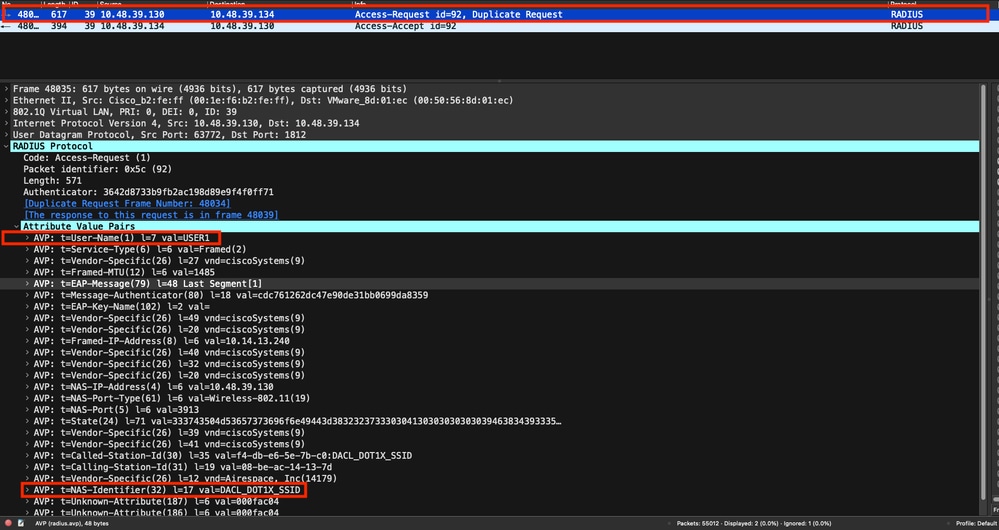
You can see the client RADIUS access-request is sent from the WLC to the RADIUS server to authenticate USER1 (AVP User-Name) on the DACL_DOT1X_SSID SSID (AVP NAS-Identifier).
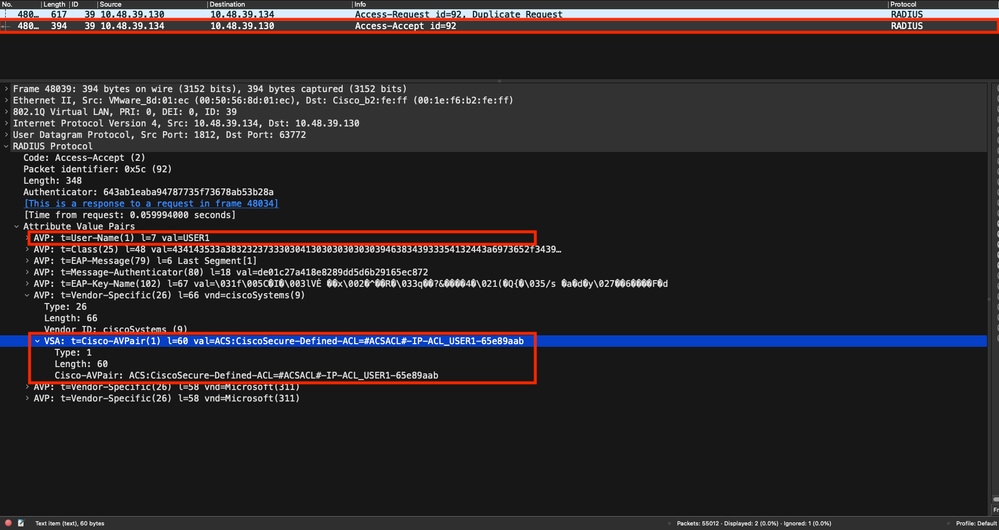
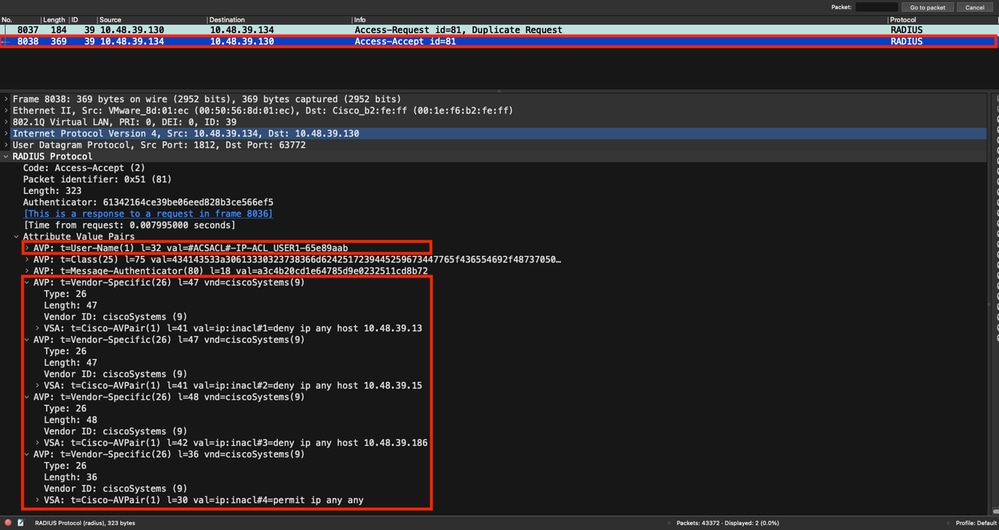
When the authentication is successful, the RADIUS server replies with an access-accept. For user USER1 (AVP User-Name) and when applying the AAA attributes, the vendor specific AVP ACS:CiscoSecure-Defined-ACL being #ACSACL#-IP-ACL_USER1-65e89aab.
DACL Download
If the dACL is already part of the WLC configuration, it is assigned to the user and the RADIUS session ends. Otherwise, WLC downloads the ACL, still using RADIUS. To do so, the WLC sends a RADIUS access-request, this time using the dACL name (#ACSACL#-IP-ACL_USER1-65e89aab) for the AVP User-Name. The WLC informs the RADIUS server this access-accept initiates an ACL download using the Cisco AV pair aaa:event=acl-download.
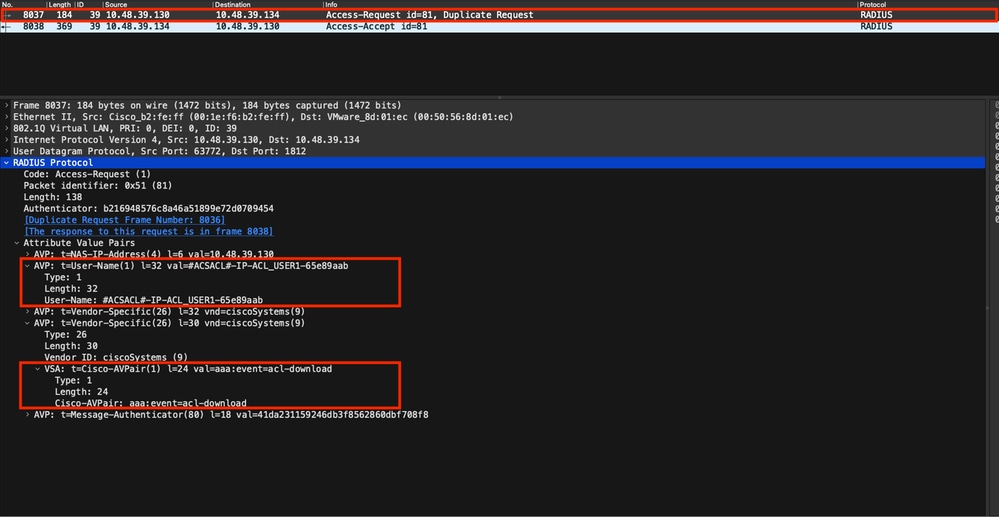
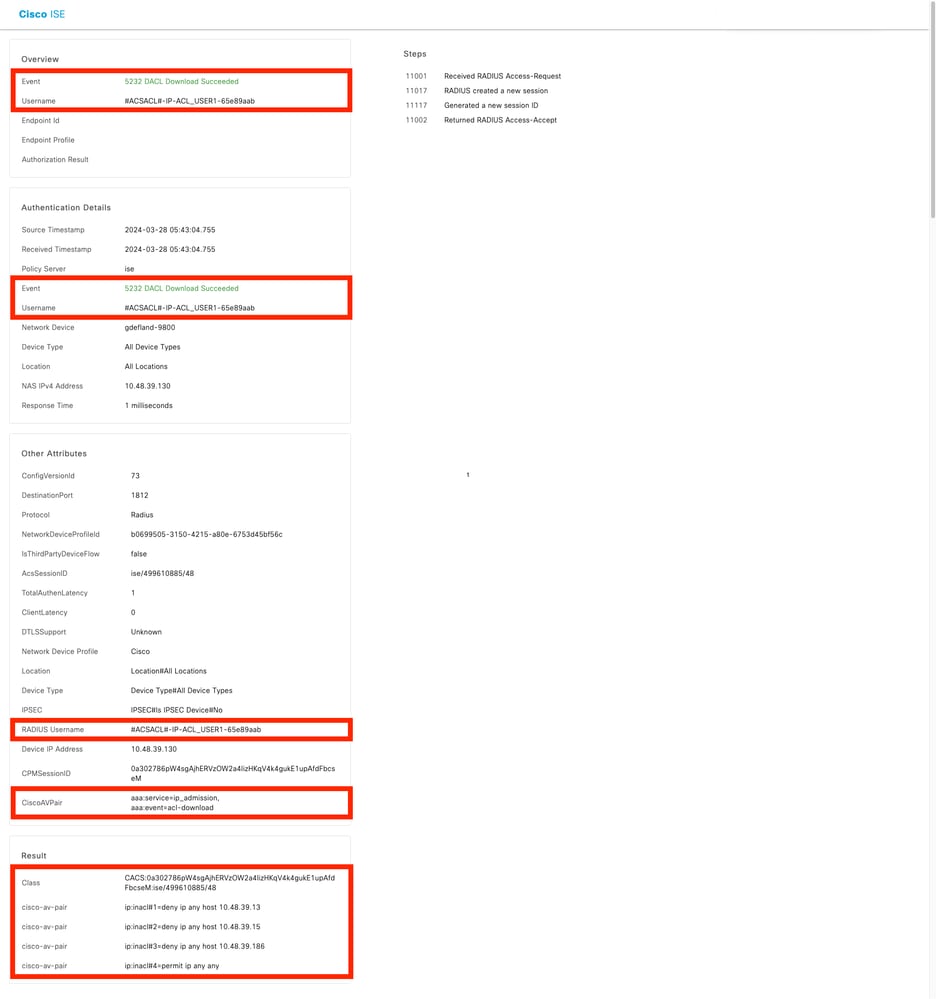
The RADIUS access-accept sent back to the controller contains the dACL requested, as shown in the screenshot. Each ACL rule is contained inside a different Cisco AVP of type ip:inacl#<X>=<ACL_RULE>, <X> being the rule number.
Note: If the content of an ACL is modified after it has been downloaded on the WLC, the change for this ACL is not reflected until a user re-authenticates (and the WLC performs a RADIUS authentication for a user again). A change in the ACL is reflected by a change in the hash portion of the ACL name. The next time this ACL is assigned to a user, its name must be different and the ACL must not be part of the WLC configuration. However, clients that authenticate before a change on the ACL continue to use the previous one until they fully re-authenticate.
ISE Operation Logs
RADIUS Client Authentication
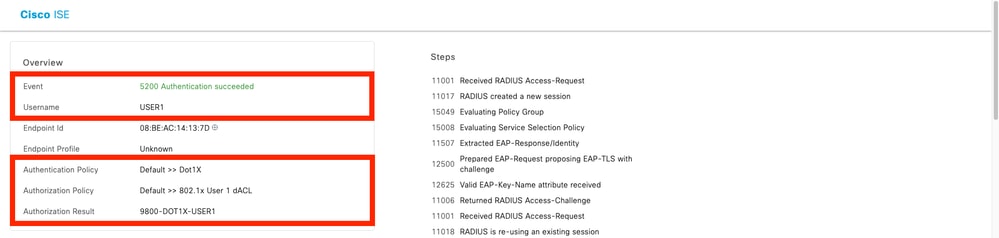
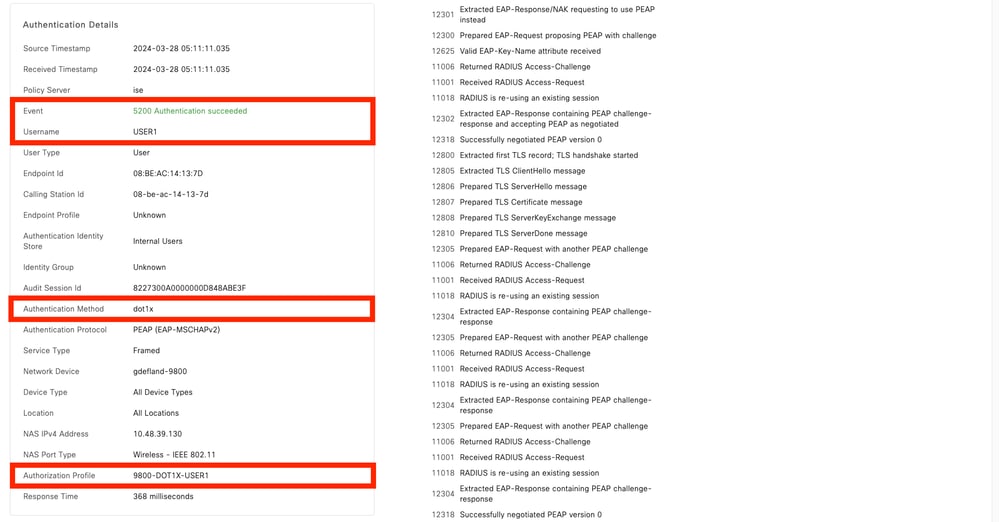
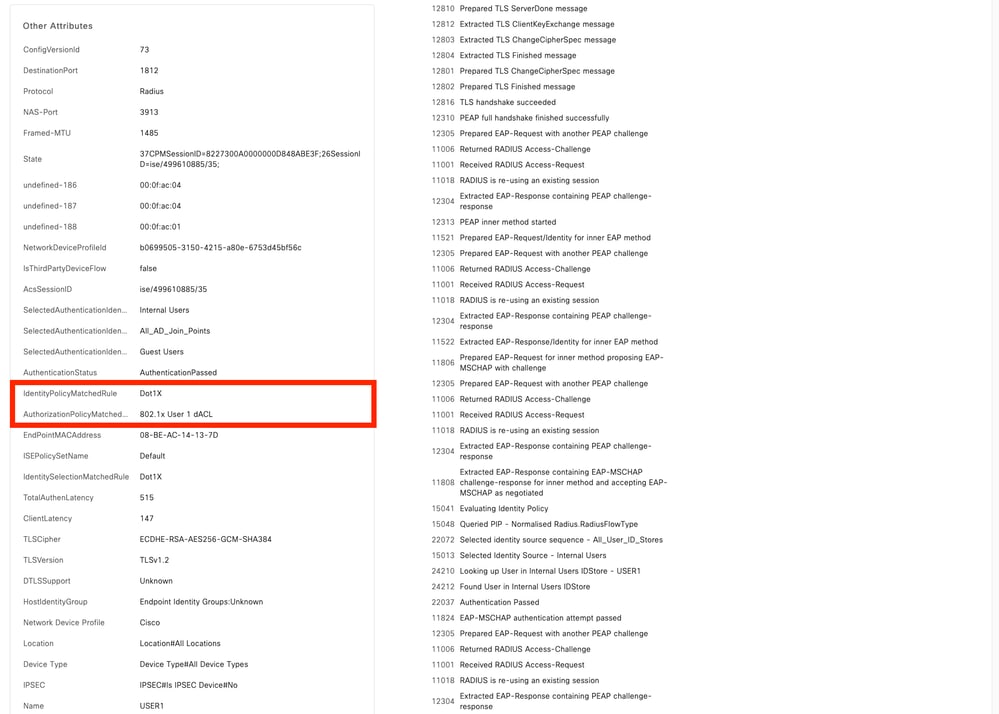
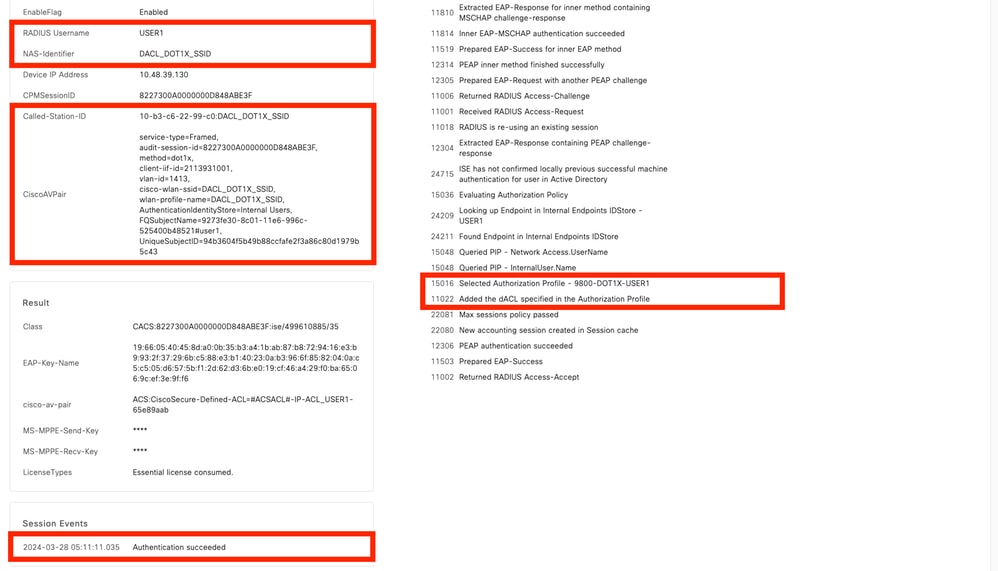
The operation logs show a successful authentication of the user USER1, where the downloadable ACL ACL_USER1 is applied. Parts of interest for troubleshooting are framed in red.
DACL Download
The operation logs show a successful download of the ACL ACL_USER1. Parts of interest for troubleshooting are framed in red.
Revision History
| Revision | Publish Date | Comments |
|---|---|---|
4.0 |
26-Oct-2026
|
Updated spelling, grammar, spacing, inserted horizontal lines to separate sections for readability, fixed CCW alerts, and alt text. |
3.0 |
06-Oct-2026
|
Branding and formatting. |
2.0 |
25-Apr-2024
|
Initial Release |
1.0 |
25-Apr-2024
|
Initial Release |

 Feedback
Contact Cisco
- Open a Support Case

- (Requires a Cisco Service Contract)