对安全Web设备中的智能许可证进行故障排除

目录
简介
本文档介绍在安全网络设备(SWA)中配置智能许可证并对其进行故障排除的步骤。
先决条件
要求
Cisco 建议您了解以下主题:
- 智能许可证的工作原理
- 安全网络设备(SWA)管理
Cisco 建议您:
- 已安装物理或虚拟安全网络设备(SWA)
- 对SWA的管理访问
- 访问思科智能许可证门户
使用的组件
本文档不限于特定的软件和硬件版本。
本文档中的信息都是基于特定实验室环境中的设备编写的。本文档中使用的所有设备最初均采用原始(默认)配置。如果您的网络处于活动状态,请确保您了解所有命令的潜在影响。
思科智能许可证
智能许可能够:
- 从中心位置管理所有产品许可证。
- 使用一种方法应用和管理许可证,规范化物理和虚拟邮件安全设备(ESA)/安全管理设备(SMA)/SWA之间的流程。
- 将许可证轻松应用于ESA/SMA/SWA。
- 接收与许可证到期相关的警报。
- 硬件型号ESA/SMA/SWA开箱即用,对所有服务具有90天的评估期。
要通过智能许可注册SWA,设备的所有者必须拥有智能帐户:
- 每个域颁发一个智能帐户。
- 智能帐户的管理员可以创建允许资源隔离的子级虚拟帐户。
- 虚拟帐户可用于根据您的需求限制对不同思科产品许可证的访问。
- 访问思科智能软件管理器(CSSM)以管理许可证和下载令牌。
思科提供的资源链接,包括与智能许可相关的视频、指南和说明:
智能软件管理器卫星
思科智能软件管理器卫星是思科智能许可的一个组件。CSSM Satellite与CSSM配合使用,可管理产品许可证,提供近乎实时的可见性和正在使用的思科许可证报告。
出于安全原因,如果您不想使用驻留在Cisco.com上的智能软件管理器来管理客户群,您可以选择在本地安装智能软件管理器卫星。
有关智能软件管理器卫星的详细信息,请参阅思科智能软件管理器 — 思科。
与智能许可证相关的定义
许可证类型:
- 传统许可证(CL)是指用于硬件和虚拟许可证的传统方法。
- 智能许可证(SL)
许可证授权状态:设备内给定许可证的状态。
- ESA/SWA/SMA不会在Smart Licenses页面显示实际到期日期。
- 地点:GUI >系统管理>许可证
- 位置:CLI > License_smart > SUMMARY
特定功能的状态将显示为以下值之一:
- 评估:
- SL服务已在新的(硬件)ESA/SMA上启用,无需令牌注册。
- 已在安装了当前CL的设备上启用了SL服务。
- 评估已过期:90天评估智能许可证已过期,设备已过渡至额外的30天宽限期。
- In-Compliance:设备已使用令牌注册,当前功能使用有效的许可证。
- 不合规(宽限期):可在以下两种情况下观察:
- 一键式的30天临时功能许可证请求正在使用。
- 设备上的许可证已过期,且已启动30天的宽限期。
- 不合规(已过期):许可证已完全过期,相关服务不再运行。

注意:Perpetual键表示此功能没有到期期限。Dormant密钥表示该功能具有必须接受的最终用户许可协议(EULA),或者必须配置并启用该功能。完成后,该功能将变为“活动”,到期计时器开始。
在安全Web设备中配置智能许可证
您可以通过图形用户界面(GUI)和命令行界面(CLI)将SWA连接到智能许可证。
开始使用前

警告:在ESA/SMA/SWA上启用智能许可证功能是永久性的,不允许选择将设备恢复为传统许可证模式。
- 购买的所有硬件型号SWA都包括针对所有功能的90天评估许可证。
- 使用当前传统许可证(CL)迁移至智能许可证的所有硬件型号均可获得90天的评估许可证。
- 所有虚拟SWA型号都需要基本虚拟许可证(VLN),它是一个XML文件,通过CLI loadlicense命令加载到设备,以链接到升级/更新服务器。
- 所有虚拟SWA模型创建时不包含90天许可证,并且需要通过传统许可证VLAN(有时称为XML)文件进行注册。
- 使用当前传统许可证(CL)迁移的所有虚拟SWA型号都包括90天评估许可证。
- 目前,SWA在所有版本版本版本中都具有智能许可证,这是一项可选功能。
- 启用智能许可证后,该盒上将不再使用传统许可证。
- 启用智能许可证后,无法保留传统许可证。
- 在SWA版本15.0及更高版本版本版本中,可以选择直接启用智能许可证,而不启用传统许可证。必须购买并配置许可证,才能将SWA与智能许可证配合使用。
- 从15.0版本版本开始,有30天的宽限期用于全新安装和注册智能许可证,无需任何传统许可证激活。
- 在15.1版本的最新版本中,必须提供智能许可证,才能使SWA正常运行。此外,最新版本中将删除所有传统许可证相关的功能。
- 如果基本版本中未启用智能许可证,则通过升级到智能许可证授权版本,SWA在下载时受到限制。
CLI和GUI显示中的更改
在CLI for Classic License中使用了4个命令。因此,在智能许可证授权版本(15.1及更高版本)中,这些命令将被删除。
查看删除的CLI命令列表:
- loadlicense
- showlicense
- 功能密钥
- featurekeyconfig
在传统许可证的GUI中,System Administration(系统管理)选项卡中提到两页。在智能许可证授权构建中,这些页面将被删除。
删除的GUI页面列表:
- 功能密钥设置
- 功能密钥
重置并重新加载
SWA中的重置配置执行出厂重置,此时整个配置已擦除并且SWA恢复为出厂状态。使用智能许可证授权时,构建具有相同的行为,该行为将被保留。
Reload是一个CLI隐藏命令,用于清除配置数据并删除功能密钥。如果SWA已注册到传统许可证,且已执行重新加载,请再次加载许可证。
如果SWA配置了智能许可证,则重新加载后,将取消注册并禁用智能许可证,同时在当前的SWA行为中重置出厂设置。
在SWA授权构建版本中,智能许可证不会恢复到disable状态,因此reload命令会清除所有配置。智能许可证处于registered状态,因此,再次请求所有许可证。
通信要求
通过TCP端口443与smartreceiver.cisco.com进行网络或代理通信。要从SWA测试连接,请执行以下步骤:
1.登录到CLI。
2.键入telnet并按Enter。
3.选择您希望SWA连接到智能许可证服务器的接口。
4.输入smartreceiver.cisco.com。
5.在端口部分输入443并按Enter。
注意:如果已配置智能软件管理器卫星,请在第4步中添加与该服务器关联的统一资源定位器(URL)或Internet协议(IP)地址。
以下是成功连接的示例:
> telnet

Please select which interface you want to telnet from.
1. Auto
2. Management (10.48.48.184/24: management.swa1.cisco.com)
3. P1 (192.168.13.184/24: p1.swa1.cisco.com)
4. P2 (192.168.133.184/24: p2.swa1.cisco.com)
[1]> 4

Enter the remote hostname or IP address.
[]> smartreceiver.cisco.com

Enter the remote port.
[23]> 443

Trying 10.112.59.81...
Connected to smartreceiver.cisco.com.
Escape character is '^]'.
下面是一个连接失败的示例:
SWA_CLI> telnet

Please select which interface you want to telnet from.
1. Auto
2. Management (10.48.48.184/24: management.swa1.cisco.com)
3. P1 (192.168.13.184/24: p1.swa1.cisco.com)
4. P2 (192.168.133.184/24: p2.swa1.cisco.com)
[1]> 2

Enter the remote hostname or IP address.
[]> smartreceiver.cisco.com

Enter the remote port.
[23]> 443

Trying 10.112.59.81...
telnet: connect to address 10.112.59.81: Operation timed out
Trying 2a04:e4c7:fffe::f...
bind: Invalid argument注意:要退出telnet,如果Ctrl + C不起作用,请按住Control,然后按],然后键入q,然后按Enter。
从GUI配置智能许可证
1.登录到GUI并导航到系统管理。
2.选择智能软件许可。
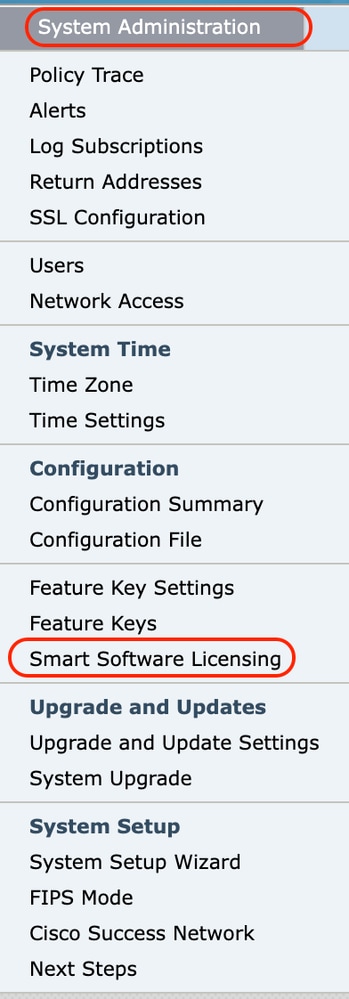 图像 — 选择智能软件许可
3.选择启用智能软件许可。
 图像 — 选择启用智能软件许可(Enable Smart Software Licensing)
4.仔细阅读说明,然后单击OK。
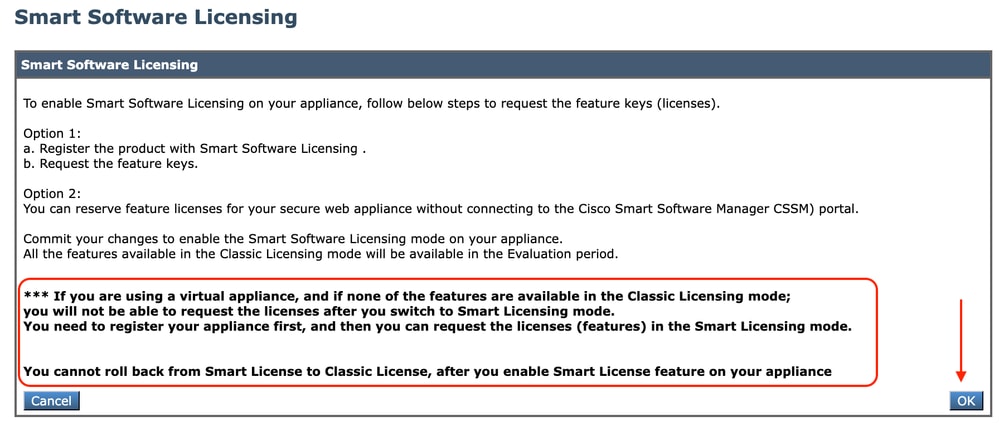 图像 — 仔细阅读说明
警告:在设备上启用智能许可证功能后,不能从智能许可证回滚到经典许可证。
5.提交更改。
6.等待一段时间,然后刷新“智能许可”页面。
7.选择Smart License Registration,然后单击Confirm。
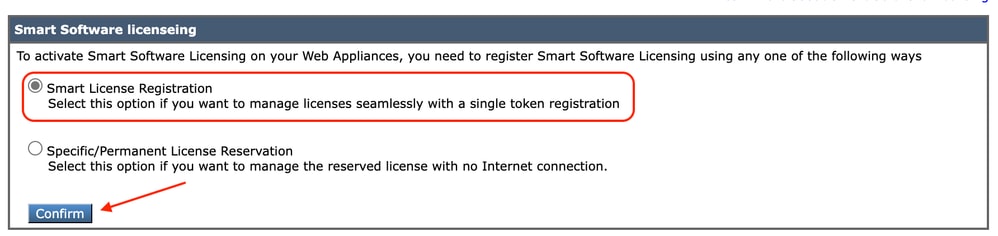 图像 — 选择智能许可证注册
8.(可选):如果您的网络中有智能软件管理器卫星,请在传输设置中添加服务器的URL或IP地址。
9.如果您有单独的路由表,并且无法从Management接口访问Smart Receiver;从测试接口部分选择数据。
默认情况下,管理路由表处于选中状态。
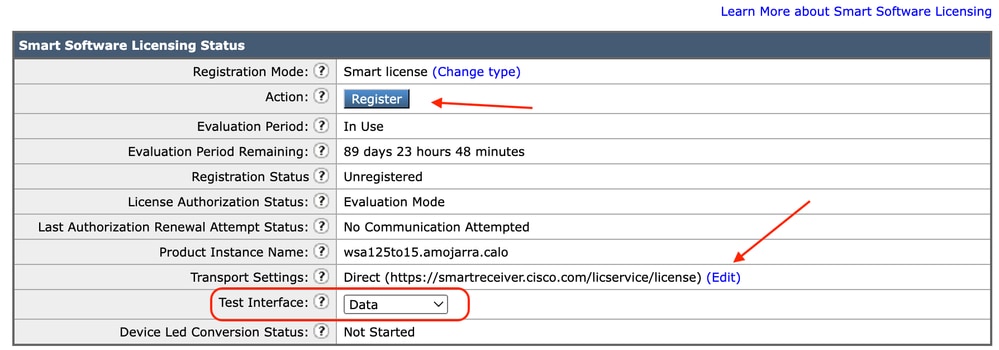 图像 — 选择路由表
10.选择注册以定位至“注册”页。
11.登录智能软件管理器门户(思科软件中心)或智能软件管理器卫星。
12.定位至库存标签,如果您还没有令牌,则生成一个新令牌。或者点击蓝色箭头查看您的令牌。
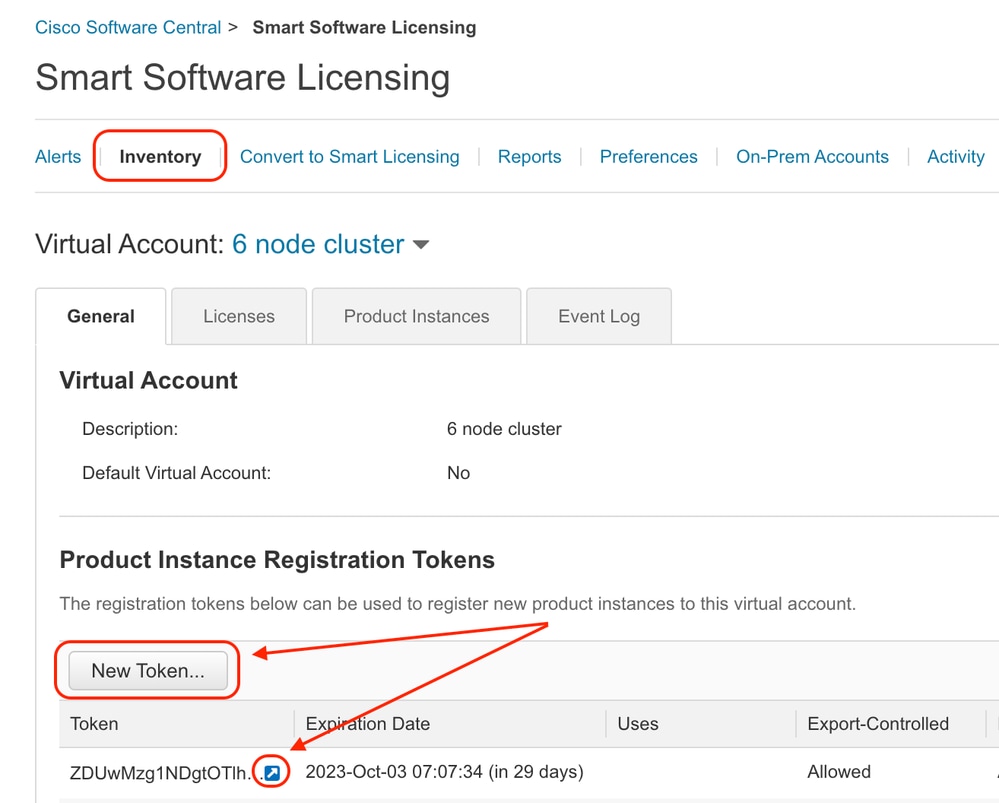 图像 — 导航到资产
13.(可选):要创建注册令牌,请选择New Token并填写所需字段。
14.将智能许可证门户中的令牌粘贴到您的SWA中,然后选择Register。
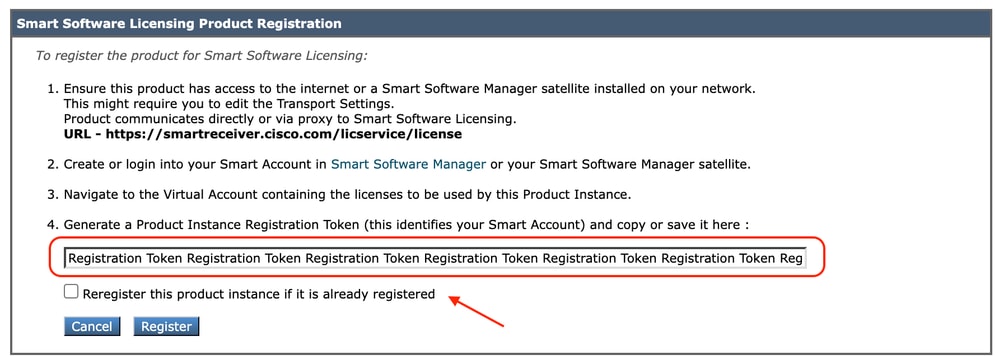 图像 — 粘贴注册令牌
15.(可选):如果设备已注册,则选中此复选框后,您可以重新注册设备。
16.几分钟后,您可以检查注册状态。
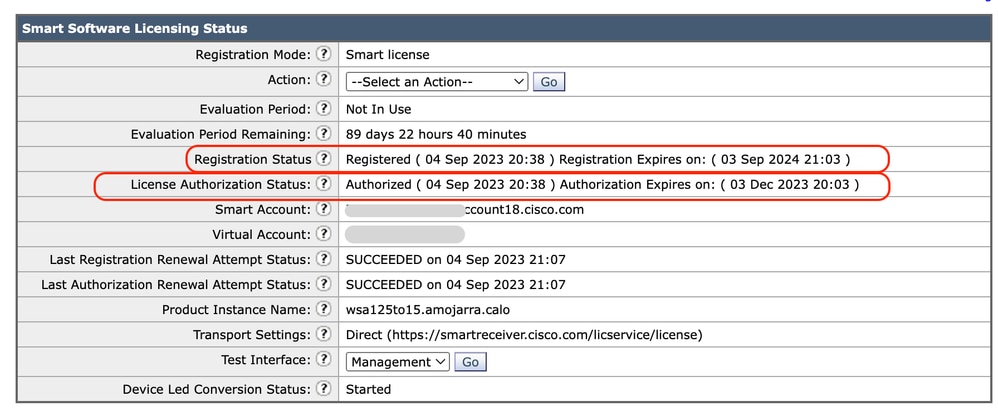 映像 — 已注册设备
验证集成
您可以从GUI、CLI或智能许可证门户验证集成。
从GUI验证智能许可证状态
1.登录到GUI并导航到系统管理。
2.选择智能软件许可。
3.检查以下项目:
- 注册状态
- 许可证授权状态
- 上次注册续约尝试状态
- 上次授权续订尝试状态
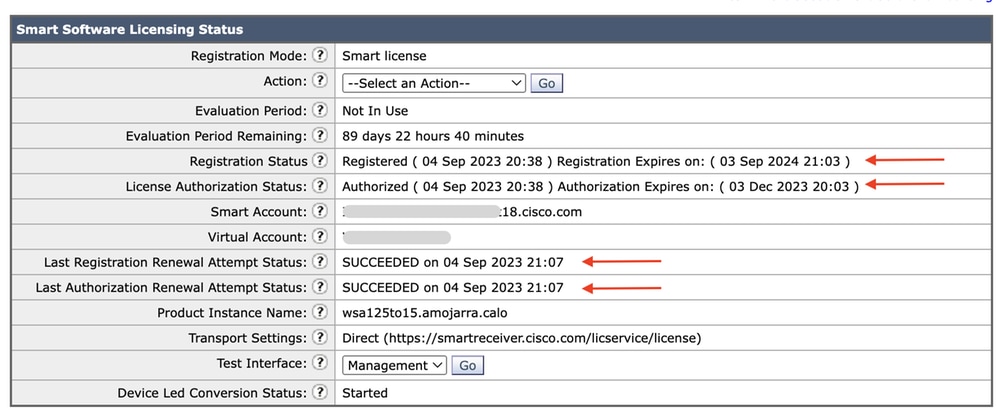 图像 — 在GUI中验证智能许可证
4.从System Administration菜单中,选择Licenses。
5.检查所需许可证是否符合要求。
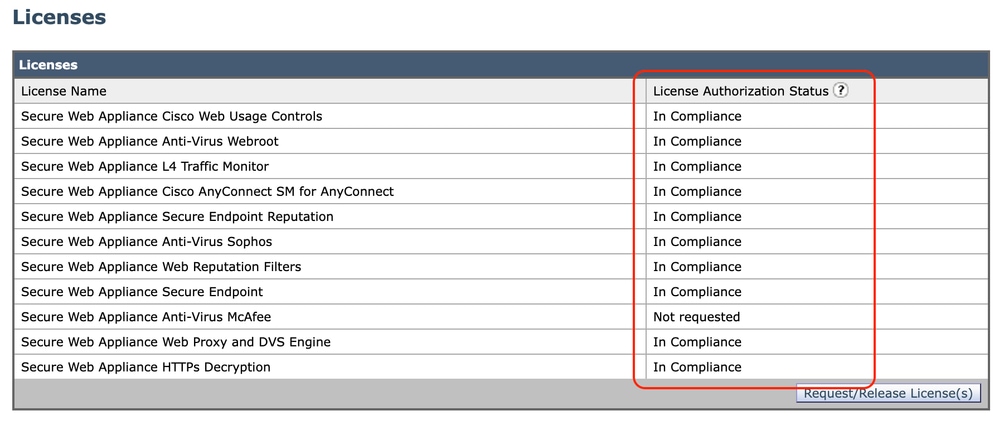 映像 — 许可证状态
从CLI验证智能许可证状态
使用以下步骤从CLI验证智能许可证状态:
1.登录到CLI。
2.输入license_smart。
3.选择状态。
4.核实以下项目:
- 注册状态
- 许可证授权状态
- 上次注册续约尝试状态
- 上次授权续订尝试状态
Smart Licensing is : Enabled

License Reservation is: Disabled
Evaluation Period: Not In Use
Evaluation Period Remaining: 89 days 22 hours 40 minutes
Registration Status: Registered ( 04 Sep 2023 20:38 ) Registration Expires on:  ( 03 Sep 2024 21:03 )
Smart Account: XXXXXXXXXXXX18.cisco.com
Virtual Account: XXXXXXXXX
Last Registration Renewal Attempt Status: SUCCEEDED on 04 Sep 2023 21:07
License Authorization Status: Authorized ( 04 Sep 2023 20:38 ) Authorization Expires on:  ( 03 Dec 2023 20:03 )
Last Authorization Renewal Attempt Status: SUCCEEDED on 04 Sep 2023 21:07
Product Instance Name: wsa125to15.amojarra.calo
Transport Settings: Direct (https://smartreceiver.cisco.com/licservice/license)
Device Led Conversion Status: Started
5.在license_smart向导中,输入SUMMARY。
[]> SUMMARY

Feature Name                                                        License Authorization Status
----------------------------------------------------------------------------------------------------
Secure Web Appliance Cisco Web Usage Controls                          In Compliance
Secure Web Appliance Anti-Virus Webroot                                In Compliance
Secure Web Appliance L4 Traffic Monitor                                In Compliance
Secure Web Appliance Cisco AnyConnect SM for AnyConnect                In Compliance
Secure Web Appliance Secure Endpoint Reputation                        In Compliance
Secure Web Appliance Anti-Virus Sophos                                 In Compliance
Secure Web Appliance Web Reputation Filters                            In Compliance
Secure Web Appliance Secure Endpoint                                   In Compliance
Secure Web Appliance Anti-Virus McAfee                                 Not requested
Secure Web Appliance Web Proxy and DVS Engine                          In Compliance
Secure Web Appliance HTTPs Decryption                                  In Compliance
6.检查所需许可证是否符合要求。
验证智能许可证门户中的设备状态
1.登录智能软件许可门户:思科软件中心。
2.选择Inventory选项卡。
3.选择产品实例。
4.验证您的设备是否已列出,然后单击设备名称。
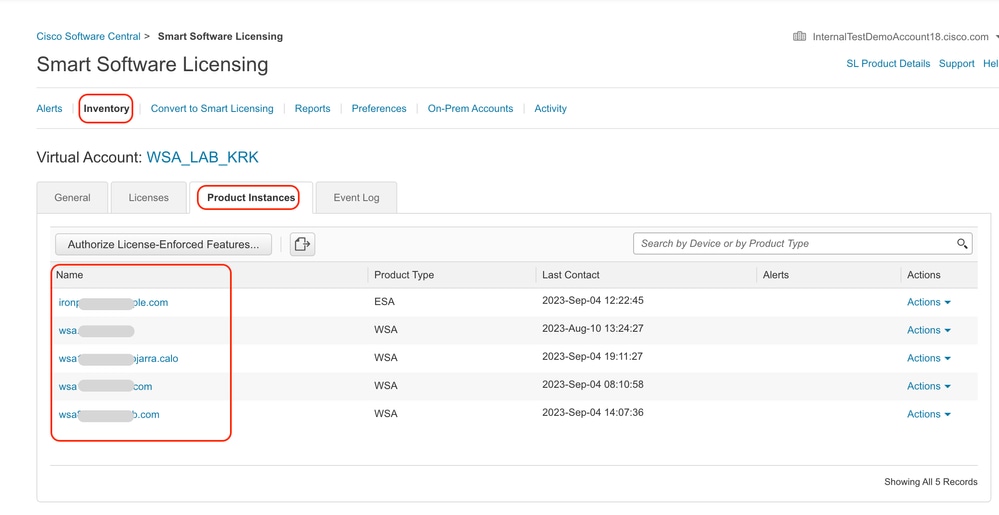 图像 — 在智能许可证门户中验证设备状态
5.观察General选项卡中的Feature Keys和device status。
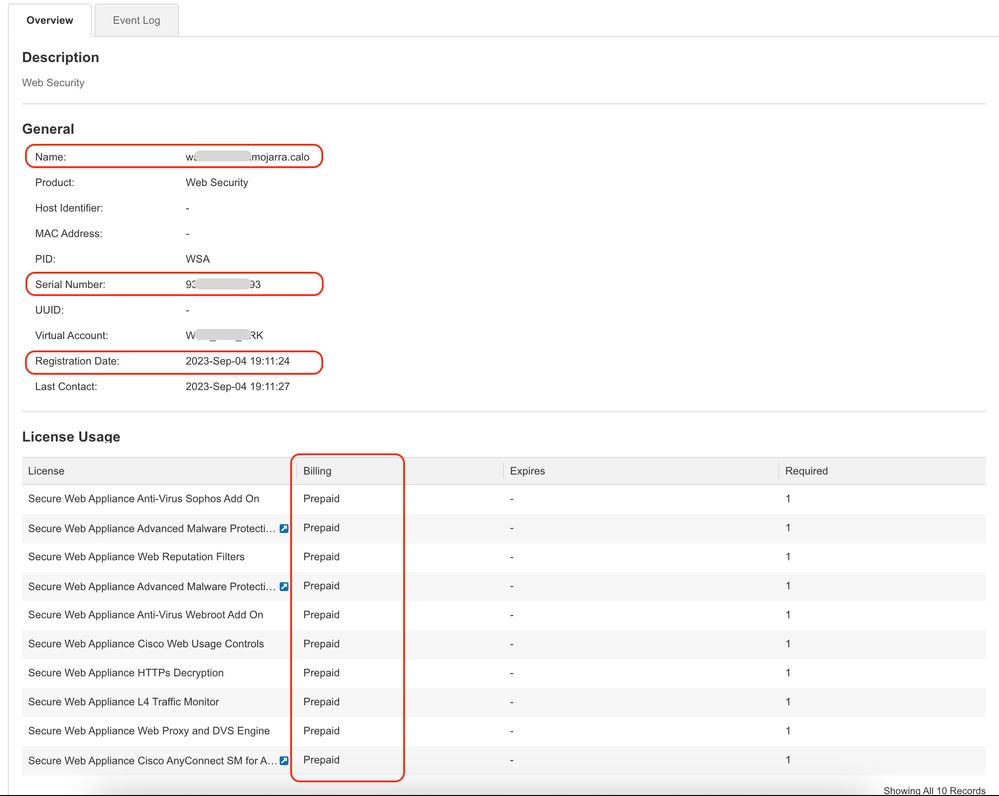 图像 — 验证智能许可证门户中的功能密钥
从CLI查找VLAN
要从CLI查看您的VLAN,请运行smartaccountinfo命令。您可以查看一些附加信息,如虚拟帐户域或ID和产品实例。
> smartaccountinfo

Smart Account details
---------------------

Product Instance ID       : 609XXXXXXXX-fXXXXXXXXX55
Smart Account Domain      : XXXXXXXXXXXXXXXXXXX18.cisco.com
Smart Account ID          : 111111
Smart Account Name        : XXXXXXXXXXXXXXXXXXX18.cisco.com
VLN                       : VLNWSA1111111
Virtual Account Domain    : WSA_XXXXX
Virtual Account ID        : 111111
日志记录
与智能许可证相关的所有日志都收集在Smartlicense日志中。默认情况下启用此日志。
使用以下步骤配置智能许可证日志:
1.登录到GUI。
2.从System Administration(系统管理)菜单中,选择Log Subscriptions(日志订阅)。
3.选择Smartlicense Logs。
4.单击日志名称以编辑配置。

提示:如果要将日志推送到日志收集器服务器,建议创建新的日志订阅并转发这些日志,以便在SWA上本地拥有日志副本
智能许可证故障排除
这些是常见错误以及解决问题的步骤。
成功连接
以下是成功响应的smart_license日志示例:
Mon Sep 4 20:39:32 2023 Info: The product is registered successfully with Smart Software Manager.Registration failed
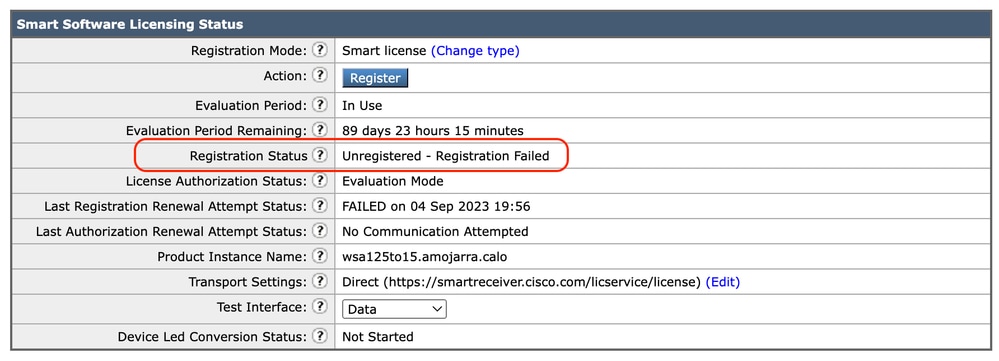 映像 — 注册失败
如果返回Registration Failed,请使用以下步骤从CLI检查smart_license日志:
1.登录到CLI。
2.输入grep。
3.查找与smartlicense日志关联的编号,然后输入编号。
4.单击Enter,直到您看到日志。
通信发送错误
如果看到“通信发送错误”,请检查SWA和端口TCP 443上的智能许可证服务器之间的连接。
Mon Sep 4 19:57:09 2023 Warning: The registration of the product with Smart Software Manager failed. The response from Smart Software Manager is: Communication send error. 提示:如果已配置智能软件管理器卫星,请验证与已配置端口号的连接。
要检查连通性,请按照本文通信要求一节中提供的步骤操作。
此外,在显示警报中,您还会看到相同的错误消息:
04 Sep 2023 20:19:29 +0200 The registration of the product with Smart Software Manager failed. The response from Smart Software Manager is: Communication send error.令牌无效
如果令牌已过期或达到其定义的最大使用值,则返回警告日志令牌无效。
您可以通过displayalerts命令或smartlicense日志验证错误。
这是CLI中displayalerts的示例错误:
04 Sep 2023 20:26:55 +0200 The registration of the product with Smart Software Manager failed. The response from Smart Software Manager is: Token is not valid以下是smartlicense日志中来自CLI的日志行的示例:
Mon Sep 4 20:26:55 2023 Warning: The registration of the product with Smart Software Manager failed. The response from Smart Software Manager is: Token is not valid要验证登录智能许可证门户的令牌有效性,请导航到资产,检查到期状态和使用次数。
 图像 — Expier令牌
未能续订授权
通信发送错误
如果您收到由于通信发送错误而导致的更新授权失败,这可能是由于连接问题。确保选择了正确的路由表,并测试SWA与smartreceiver.cisco.com TCP端口443或您的智能软件管理器卫星服务器之间的连接。
要检查连通性,请按照本文通信要求一节中提供的步骤操作。
您可以使用displayalerts命令或smartlicense日志验证错误
以下是CLI中displayalerts的示例错误:
04 Sep 2023 22:23:43 +0200 Failed to renew authorization of the product with Smart Software Manager due to Communication send error..这是来自CLI的smartlicense日志的示例日志行:
Mon Sep 4 22:22:58 2023 Warning: Failed to renew authorization of the product with Smart Software Manager due to Communication send error..证书已吊销
如果更新授权的原因是证书已撤销,请验证设备是否已从智能许可证门户删除。检查本文中的在智能许可证门户中验证设备状态部分。
通过运行displayalerts命令或从smartlicense日志验证错误。
以下是CLI中displayalerts的错误示例:
04 Sep 2023 22:39:10 +0200 Failed to renew authorization of the product with Smart Software Manager due to Could not return the certificate for the given sn (111111111) since it is REVOKED..下面是来自CLI的smartlicense日志的示例行:
Mon Sep 4 22:39:10 2023 Warning: Failed to renew authorization of the product with Smart Software Manager due to Could not return the certificate for the given sn (1111111) since it is REVOKED..要解决此问题,请重新注册设备。
设备中没有VLAN
对于物理设备,没有VLN;虚拟许可证编号主要用于虚拟设备。如果您使用的是虚拟SWA,并且CLI中smartaccountinfo的输出中没有VLN,请尝试在CLI中使用loadlicense命令再次加载XML许可证文件。
警告:在安装新的许可证文件和密钥之前,loadlicense命令会从系统中删除所有现有的功能密钥(包括评估密钥)和许可证文件。
智能许可证代理服务不可用
如果收到此错误消息,则是由于Cisco Bug ID:SWA或思科漏洞ID的CSCwe36665:CSCvo22855,用于ESA。联系TAC实施解决方法。
"Smart license agent service is unavailable. Please visit this page after some time. If you continue to see the same message, please contact Cisco Sales representative."验证签名失败
如果智能许可证授权失败并出现以下错误:
Tue Apr 22 09:46:27 2023 Warning: Failed to renew authorization of the product with Smart Software Manager due to Failed to verify signature..[首次测试]此错误可能是由于Cisco Bug ID:CSCvx04164(仅限注册用户)。
此Bug的条件是Smart Licensing门户上的虚拟帐户名称包含非英文字符,此问题的解决方法是:
重命名虚拟帐户并删除非英文字符:
1.转到software.cisco.com。
2.导航到管理>管理智能帐户>虚拟帐户。
3.点击有问题的虚拟帐户。
4.定义新名称并删除非英文字符。
注意:用户必须具有管理权限才能重命名虚拟帐户。
[第二次测试]如果虚拟帐户名称正确,请确保设备已列在智能许可证门户资产清单中。
使用本文中在智能许可证门户中验证设备状态部分中提供的步骤。
[第三次测试]如果设备列在智能许可证门户资产清单中,请从CLI重新启动SWA智能许可证服务:
1.登录到CLI。
2.运行diagnostic命令。
3.选择服务。
4.选择SMART_LICENSE。
5.选择“重新启动”。
SWA_CLI> diagnostic

Choose the operation you want to perform:
- NET - Network Diagnostic Utility.
- PROXY - Proxy Debugging Utility.
- REPORTING - Reporting Utilities.
- SERVICES - Service Utilities.
[]> SERVICES

Choose one of the following services:
- AMP - Secure Endpoint
- AVC - AVC
- ADC - ADC
- DCA - DCA
- WBRS - WBRS
- EXTFEED - ExtFeed
- L4TM - L4TM
- ANTIVIRUS - Anti-Virus xiServices
- AUTHENTICATION - Authentication Services
- MANAGEMENT - Appliance Management Services
- REPORTING - Reporting Associated services
- MISCSERVICES - Miscellaneous Service
- OCSP - OSCP
- UPDATER - UPDATER
- SICAP - SICAP
- SNMP - SNMP
- SNTP - SNTP
- VMSERVICE - VM Services
- WEBUI - Web GUI
- SMART_LICENSE - Smart Licensing Agent
- WCCP - WCCP
[]> SMART_LICENSE


Choose the operation you want to perform:
- RESTART - Restart the service
- STATUS - View status of the service
[]> RESTART

smart_agent is restarting.[第四次测试]在智能许可证管理器门户中生成新令牌并重新注册设备。
Smart_agent停滞于禁用状态
将设备(在升级之前启用了智能许可证)升级到版本14.1或14.0后,在ESA或SMA上可以看到这些错误。
注意:x195或x395设备上出现此错误。
以下是设备生成的消息示例:
08 Apr 2023 10:19:36 -0500 Initialization of smart agent service failed. Reason : Port 65501 is not available for smart agent service to run. Please try changing port for smart agent service through `license_smart setagentport` cli command or free the port from other service.在smart_license日志中,您可以看到:
Mon Apr 8 09:02:36 2021 Warning: Smart License: Failed to change the hostname to esa.local for the product.此错误是由于Cisco Bug ID:CSCvz74874(适用于ESA)和Cisco Bug ID(适用于SMA的CSCvx68947)。您必须联系思科支持解决此问题。
智能代理服务初始化失败
此错误主要与虚拟设备有关,这些虚拟设备所配置的资源多于预期。以下是日志示例:
Thu Jun 23 16:16:07 2022 Critical: Initialization of smart agent service failed. Reason : Port 65501 is not available for smart agent service to run. Please try changing port for smart agent service through `license_smart setagentport` cli command or free the port from other service.
any attempts to swap ports using the defined command will fail.要解决此问题,请检查CLI中version命令的输出,确保CPU数量和分配的内存设置为expected。如果设备的内核数多于支持的内核,请更正分配。
来自授权云的响应无效
如果已从智能许可证管理器门户中删除设备,则较旧版本会返回以下错误:
Thu Nov 15 13:50:20 2022 Warning: Failed to renew authorization of the product with Smart Software Manager due to Invalid response from licensing cloud..要解决此问题,请重新注册设备,同时查看思科漏洞ID:CSCvr09743。
未发送有效的SSL证书
如果从设备收到此错误且无法检索更新,请参阅现场通知:FN - 72502,了解更多信息。
21 Aug 2023 14:03:04 +0200    Unable to connect to the Cisco Aggregator Server.
Details: No valid SSL certificate was sent传统VLAN证书文件包括由Talos Keymaster创建的用于访问更新和升级的证书。旧版密钥管理证书颁发机构(CA)于2023年1月13日到期。
2021年12月15日之前所签发的证书的有效期超过12个月的VLN证书文件必须在2023年1月13日之前更新并应用。
要解决此问题,请联系思科许可证支持并请求新的VLN文件。
功能已移至不合规
如果您看到某些日志显示您的某项功能已移至“不合规”,请验证:
1.您拥有有效的许可证。
2.设备与智能许可证服务器具有连接(请参阅本文的通信要求部分)。
3.检查智能许可证日志,进一步了解此问题。
4.联系思科支持寻求帮助。
以下是示例日志:
Mon Sep 4 20:41:09 2023 Warning: Secure Web Appliance HTTPs Decryption license has been moved to Out of Compliance successfully.
Mon Sep 4 20:41:10 2023 Warning: The Secure Web Appliance HTTPs Decryption is in Out of Compliance (OOC) state. You have 29 days remaining in your grace period.
智能代理处于授权过期状态
如果收到“Smart Agent is in Authorization Expired state(智能代理处于授权过期状态)”的严重错误,请查看下一行,查找导致此状态的原因。
以下是错误示例:
Fri Aug 18 15:51:11 2023 Critical: Web Security Appliance Cisco Web Usage Controls feature will stop working as Smart Agent is in Authorization Expired state. This can happen if there is no communication between the appliance and the Cisco Smart Software Manager (CSSM) for more than 90 days.检查连接并确保设备已在智能许可证门户中注册。
相关内容
- 思科网络安全设备最佳实践指南 — 思科
- BRKSEC-3303
- 思科安全网络设备AsyncOS 14.5用户指南 — GD(通用部署) — 连接、安装和配置[思科安全网络设备] — 思科
- 思科智能软件管理器 — 思科
修订历史记录
| 版本 | 发布日期 | 备注 |
|---|---|---|
2.0 |
26-Oct-2026
|
更新的拼写、语法、间距、插入的水平线分隔各个部分,以了解可读性、可选文本、URL和固定CCW警报。 |
1.0 |
08-Sep-2023
|
初始版本 |
 反馈
