Cisco Secure Firewall/Firewall Management Center/Adaptive Security Appliance guidance - Emergency Distrust of eMudhra Root and Intermediate Certificate Authorities
Available Languages
Contents
Purpose
Below is the guidance on Cisco Secure Firewall Threat Defense (FTD), Cisco Secure Firewal Management Center (FMC), and Adapative Security Appliance (ASA) for the emergency distrust of eMudhra Root and Intermediate Certificate Authorities.
FMC local Cisco-service certificate bundle updates
FMC and FTD can automatically update a local CA bundle used for TLS connections from the appliance to Cisco services, including Smart Licensing and software, VDB, SRU, and Geolocation updates. The system checks daily at a system-defined time. Cisco documents feature availability beginning with FMC/FTD 7.0.5, 7.1.0.3, 7.2.4, and 7.3.0+. These are feature thresholds, not recommended upgrade destinations; select an upgrade target using the exact platform, source release, compatibility requirements, and current Cisco release guidance. [3, 4]
On a supported FMC or FTD CLI, show cert-update reports automatic-update status, the daily schedule, and the bundle's last-modified time. configure cert-update test checks whether the local bundle is current and whether update connectivity is ready. [4, 5, 6]
This Cisco-service bundle is separate from FTD's configured trusted-CA objects/groups used by SSL decryption and from device trustpoints used for identity or VPN certificates. You will need to verify that none of these certificates were added manually to the configuration. [5, 6]
ASA CA trustpool automatic import
On ASA, the CA trustpool and named trustpoints are separate certificate-management features. The trustpool holds CA certificates; a trustpoint is a named configuration used for certificate identity and CA enrollment. ASA trustpool auto-import is also separate from the FMC/FTD Cisco-service bundle update described above. [8, 9]
For a read-only check, run show crypto ca trustpool policy to review the trustpool certificate count, import status and result, next scheduled attempt, and effective policy details. Run show run crypto ca trustpool policy to review configured trustpool policy lines. Cisco documents automatic import as off by default. When enabled without overrides, the documented schedule is an attempt every 24 hours at 22:00 and the default Cisco URL is used; a configured time or URL can change those values. Check the actual ASA output rather than assuming automatic import is enabled or using the default schedule. [8, 9]
These checks show policy and import status; they do not provide a certificate-by-certificate inventory or establish that any named eMudhra certificate is installed, removed, or distrusted. Do not infer ASA behavior from FMC/FTD cert-update, and do not treat trustpool status as proof about certificates configured under a particular trustpoint or other application trust store. Confirm the exact ASA release and certificate-dependent service before deciding whether any product-specific action is needed. [8, 9]
Potential workaround using FTD to protect your unpatched devices
Purpose
Use Cisco Secure Firewall Management Center (FMC) to configure TLS policy rules that block server certificates with known affected eMudhra issuer names. This control can reduce exposure for headless clients and servers whose application trust stores have not yet received the required updates, but it does not block connections in all scenarios. Continue trust store remediation and certificate replacement. Do not import a compromised CA into Trusted CAs for this procedure.
Prerequisites
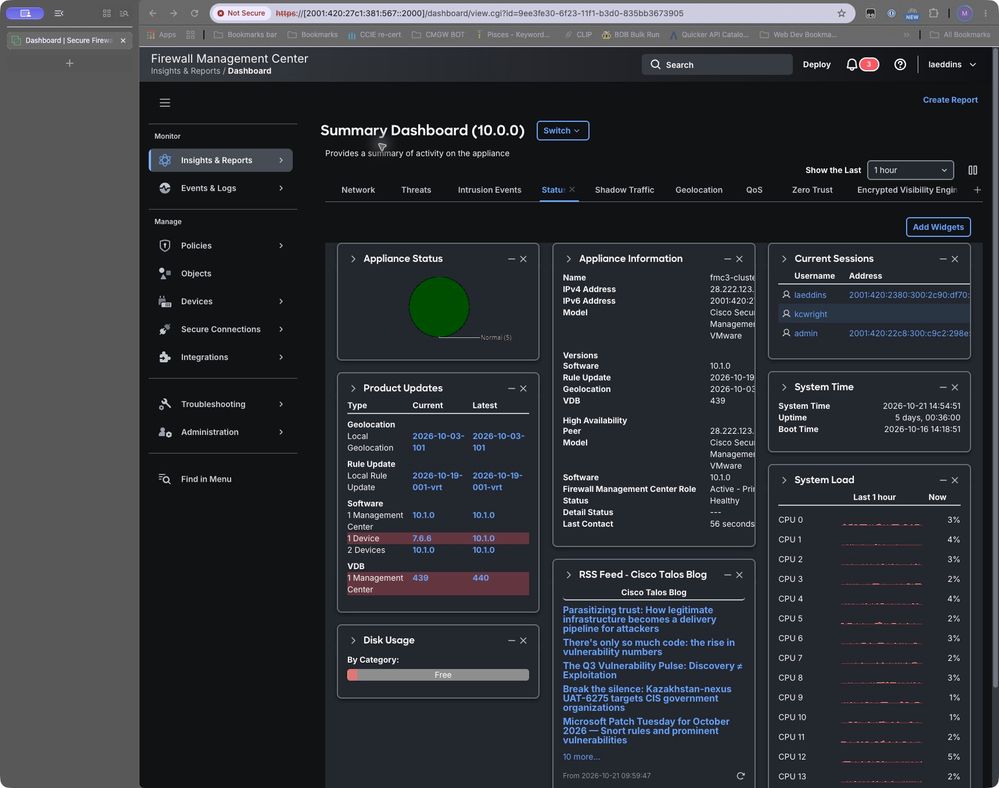
The configuration screens in this article were captured on FMC 10.1.0. The dashboard lists two managed devices on 10.0.0 and one on 7.6.6. No traffic test was performed. Before enforcement validation, record the target FTD version, Snort engine, enforcement mode, access control policy, and TLS policy. Confirm that affected outbound traffic reaches the intended policy.
Figure 1. FMC 10.1.0 and managed-device software inventory.
Configure issuer matching
Cisco documents issuer-DN conditions for matching the CA that issued the server certificate. Add a DN object with Add to Issuer in the rule editor. Available navigation and labels depend on the release. [1, 2]
1 Create the objects
Object Table
| DN |
Proposed DN object name |
| CN=EM DV TLS CA - G3B |
eMudhra_DV_G3B |
| CN=EM DV TLS CA - G3C |
eMudhra_DV_G3C |
| CN=EM EV TLS CA - G3B |
eMudhra_EV_G3B |
| CN=EM EV TLS CA - G3C |
eMudhra_EV_G3C |
| CN=EM OV TLS CA - G3B |
eMudhra_OV_G3B |
| CN=EM OV TLS CA - G3C |
eMudhra_OV_G3C |
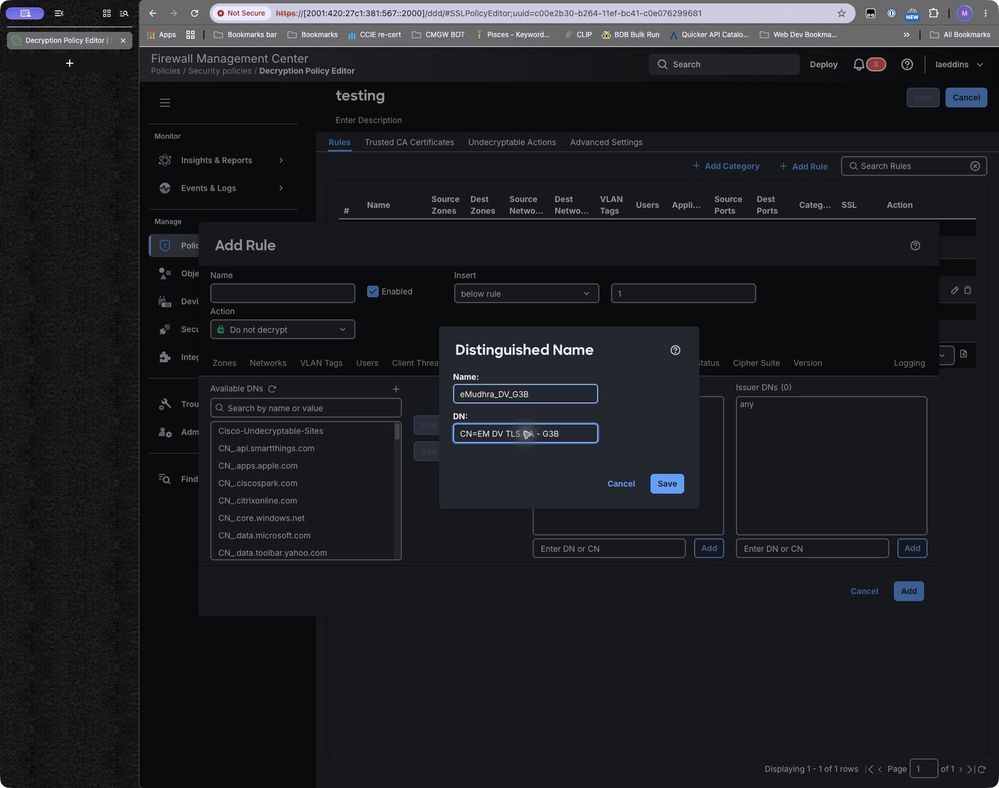
Create one narrowly scoped DN object for each in the table above.
Figure 2. Distinguished Name form showing the Name and DN fields. The example value was entered for illustration; click Save when finished.
2 Create the block rule
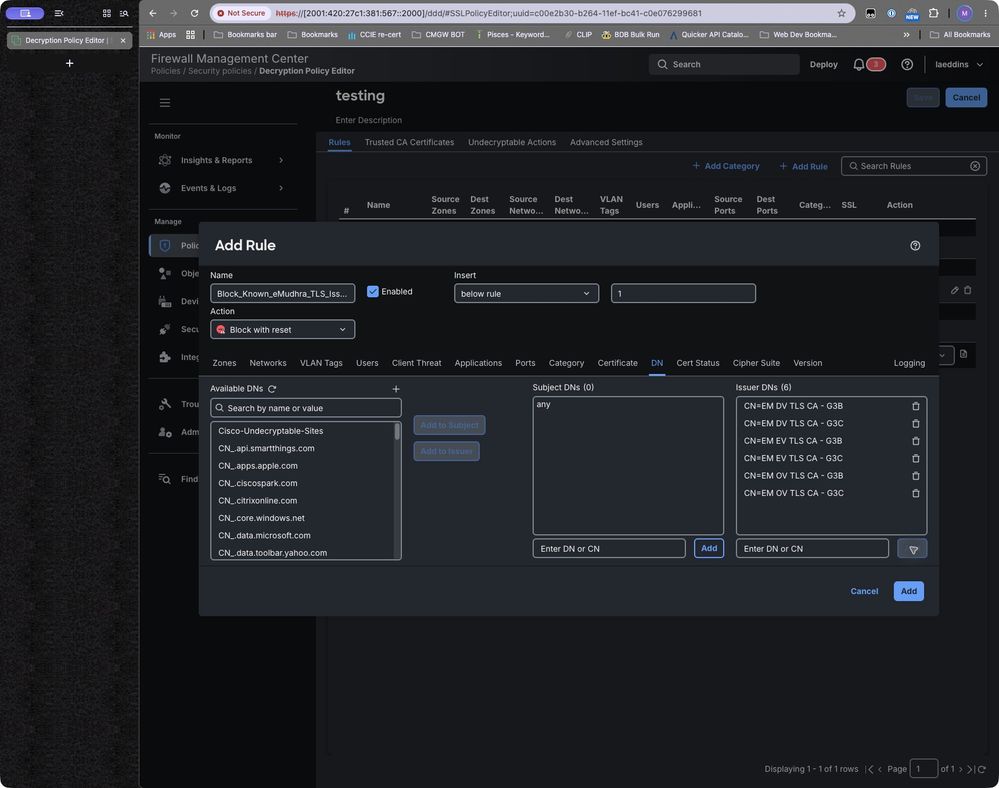
In FMC 10.1.0, select Policies > Security policies > Decryption, open the applicable policy, and click Add Rule. Name the rule Block_Known_eMudhra_TLS_Issuers. Open the DN tab. Add verified objects with Add to Issuer, or enter a DN in the Issuer DNs field labeled Enter DN or CN and click its Add button. Confirm the names appear in Issuer DNs, not Subject DNs.
Figure 3. Rule showing Block with reset, the DN tab, six Issuer DNs, and no Subject DN constraint. Click Add when finished.
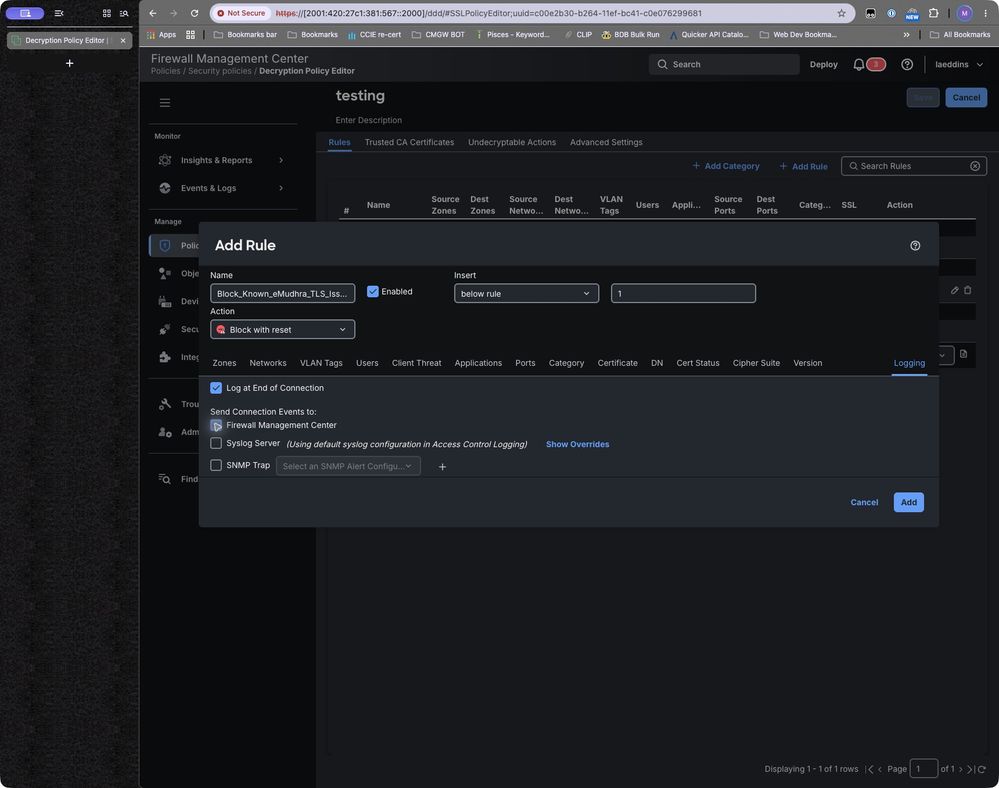
Select Block or Block with reset. Limit source zones or networks to the agreed scope. If desired, on the Logging tab, select Log at End of Connection and verify that Firewall Management Center is selected. Do not add a Valid = Yes requirement: the intended issuer block must not depend on the certificate passing trust validation.
Figure 4. Rule showing Log at End of Connection and Firewall Management Center selected. Click Add when finished
3 Review rule order and policy association
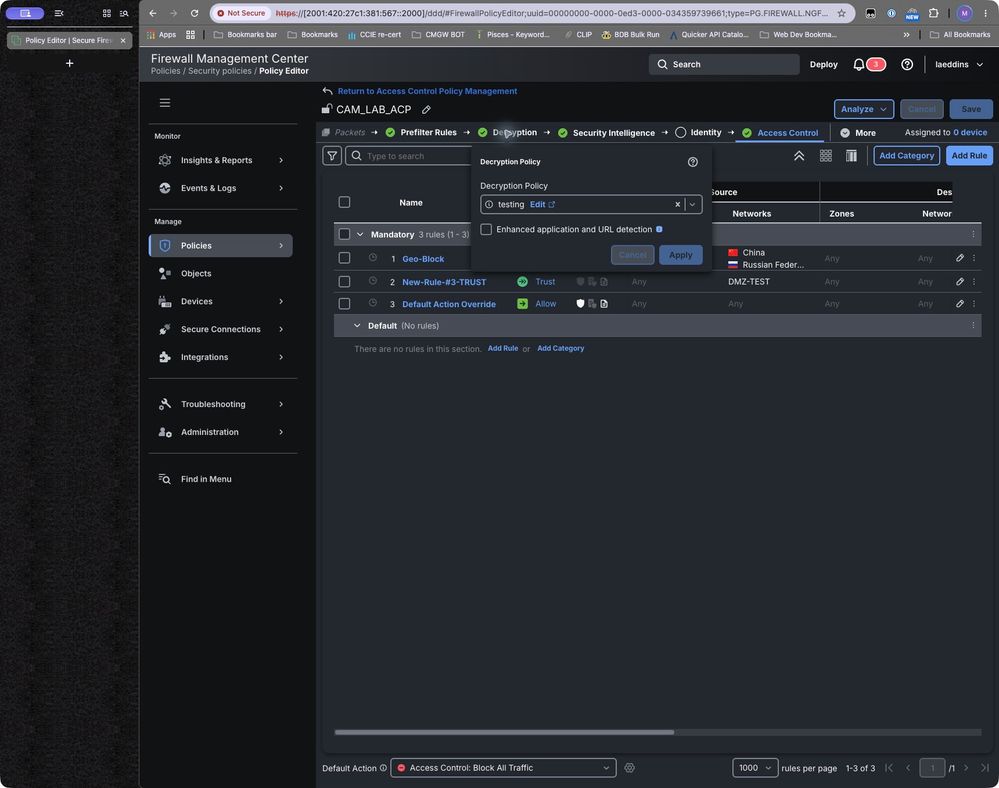
Place the rule ahead of broader rules that could handle the same traffic first. Confirm the TLS policy association with the access control policy assigned to the target devices. Review prefilter and other bypass paths before testing.
Figure 5. Existing test-policy rule table. This shows the ordering interface only.
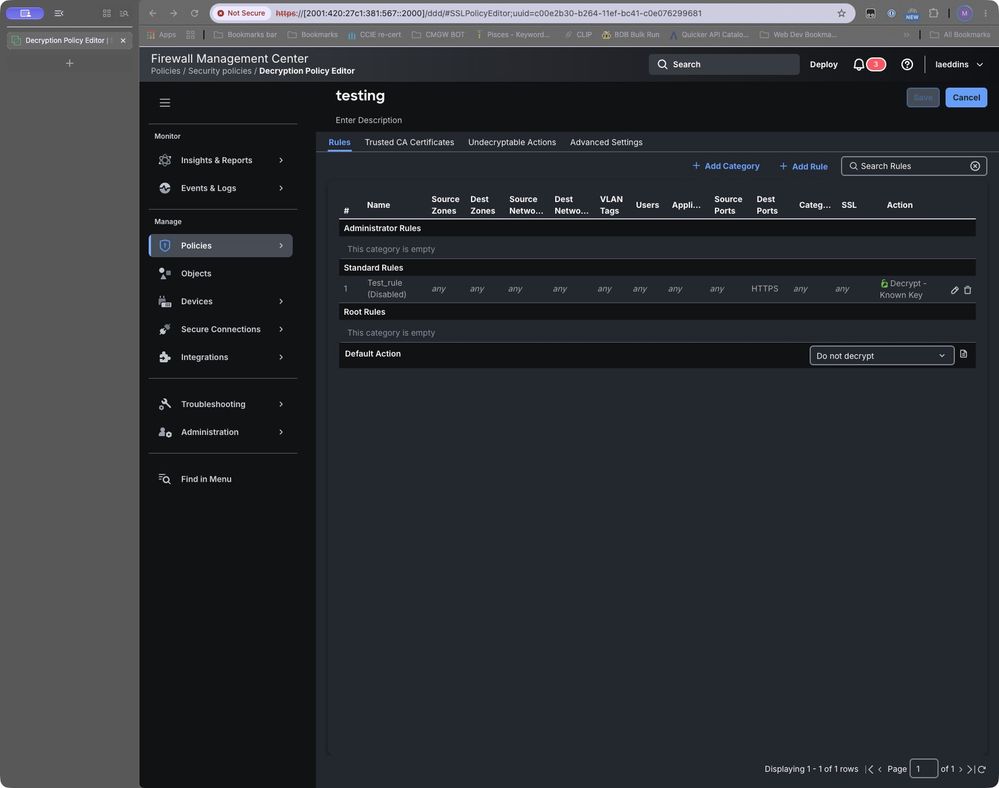
Figure 5b. The existing CAM_LAB_ACP policy references the testing decryption policy.
Deploy and verify
Deploy the changes to the devices in question. If available, test with a website that you know is using a certifcate issued by one of the CAs in question.
Troubleshoot unexpected results
If traffic passes, check deployment status, traffic scope, policy association, rule order, issuer spelling and field encoding, and whether the device had certificate information. Determine whether another rule or bypass path handled the flow. Review TLS 1.3 visibility on the tested release before claiming equivalent coverage.
Additional TLS 1.3 validation: on FMC 7.6, TLS 1.3 decryption is a separate decryption-policy advanced setting; if it is disabled, decryption rules apply only to TLS 1.2 or lower. Enabling TLS 1.3 decryption enables adaptive server-identity probing, and an Issuer DN condition can trigger a probe when the certificate is not cached. The associated access-control policy's TLS 1.3 Server Identity Discovery setting takes precedence. Cisco says these advanced settings are ignored on devices earlier than 7.1 or running Snort 2, and adaptive identity discovery is unsupported on FTDv deployed to AWS. Validate the target software/platform and certificate visibility before claiming TLS 1.3 coverage. The rule's TLS Version selector itself lists SSL 3.0 through TLS 1.2; do not rely on that selector for TLS 1.3. [7]
If unrelated traffic fails, identify the actual matching rule and issuer. Narrow the DN or traffic scope as needed, then repeat both affected and unaffected tests. Do not disable certificate validation as a workaround.
Coverage and operational limits
This solution does not block every scenario or replace the need to update other services.
Rollback and rule retirement
If the rule causes unacceptable impact, disable the new rule through the normal change process and redeploy. Preserve events and test evidence. Before retirement, confirm that the affected workloads enforce the current trust policy, repeat negative certificate-validation tests, and obtain the change owner's approval to remove temporary containment.
References
[2] FMC 10.x Rule Based Decryption Rules
[3] Secure Firewall Management Center New Features by Release
[4] Configure Automatic Update of CA Bundles for FMC and FDM
[7] FMC 7.6 Decryption Policies and TLS 1.3 guidance
[8] Cisco Secure Firewall ASA 9.22 General Operations CLI Configuration Guide — Digital Certificates
[9] Cisco Secure Firewall ASA Series Command Reference — crypto ca trustpool policy
Revision History
| Revision | Publish Date | Comments |
|---|---|---|
2.0 |
23-Oct-2026
|
Initial Release |
1.0 |
23-Oct-2026
|
Initial Release |

 Feedback
Contact Cisco
- Open a Support Case

- (Requires a Cisco Service Contract)